



Hardsync
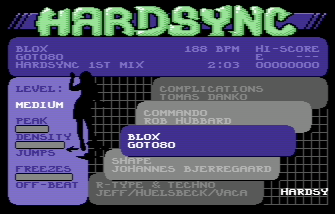
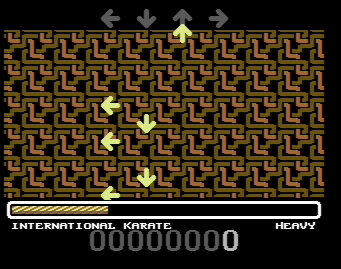
Named after one of the characteristic features of the SID chip, Hardsync is a C64 party game that follows in the (wait for it...) footsteps of games like Dance Dance Revolution and StepMania.
Using a custom adapter, I've connected a PlayStation 2 dance mat to one of the joystick ports of the C64. The adapter is documented below, in case you want to build one yourself.
It is also possible to play the game in vice, the C64 emulator. You have to enable True Drive Emulation, and since it's a PAL game, you need to select one of the PAL video chips. Map some keyboard keys to gameport 2 if you just want to try it out. But for the full experience, you really have to play with your feet; if you already have a dance pad connected to your computer (typically by means of a PSX-to-USB adapter), it should behave as a regular joystick, and be directly accessible from within vice.
Hardsync 1st mix was released at Y'2012. Here's the CSDB page.
Download
- hardsync (D64, 170.8 kB)
- Hardsync (Sid, 4.8 kB)
- Linus Akesson - Hardsync - Menu (MP3, 1.7 MB)
- Linus Akesson - Hardsync - Hi-score and menu (MP3, 2.5 MB)
- hardsync-tools-1.0 (Source tarball, 11.4 kB)
Adapter
The PlayStation 2 controllers run on 3.3 volts and use a simple SPI-based protocol (described here). The C64 gameport (described here) provides 5 volts and has five inputs which are typically shorted to ground by mechanical switches in the joystick.
The easiest way to connect a dance pad is to gut it, removing everything except the bare switches, and simply connect them to the gameport. However, if you know how to program a microcontroller, it's also quite easy to make an adapter. This has the benefit of leaving the dance pad intact, so you can still use it for other game systems.
My adapter uses an ATmega88, which is a bit overkill, but it's what I had at hand. I didn't find a PS2 connector (although this one seems nice if you happen to live in the USA), so I cut the cable.
Here is the schematic and the firmware (source). Build and connect at your own risk.
When I was trying out the adapter, I noticed that some of the bits transmitted from the mat were wrong. The down arrow, for instance, seemed to report 'triangle' events. After staring at the code for a very long time, unable to see anything wrong, I decided to rewire the hardware just to get something up and running. As I started to open the little plastic box at the edge of the mat, I realised that the warranty seal was broken. That's when I remembered that I had already rewired this mat, ages ago, because of some issue where up + down wasn't recognised as a valid joystick state. That's why, if you read the firmware source code, you'll find that the adapter interprets both 'down' and 'triangle' as 'down'.
Song management
Hardsync was designed from the start to allow the community to make and share new levels. Each song is a file, and you can move these files around freely to create your own personal mix. The first two files on the disk contain the game itself (and must be located in the first two directory entries). The rest of the disk can be filled to your liking with up to 32 songs. They will appear in the menu in reverse directory order. High scores are written back to the song files.
Once the menu system is up and running, you can change disks. After the change, you need to enter the operator menu (by holding left and right at the same time) and select "re-scan disk". The new disk doesn't have to contain the game, but it needs to have at least one song file on it.
Making new levels
The level making system is based on textfiles and command line tools. It has only been tested on Linux. First, get the tools and build them.
The song
Find (or make) a SID tune. Make sure it fulfills the following technical requirements:
- It must use PAL vertical blank timing (50 Hz). CIA timers cannot be used.
- No digis are allowed — there's no rastertime left for it.
- The following memory ranges may be used: $80-$ff and $200-$2cff (and a reasonable amount of stack). Sidreloc is your friend.
Also consider the following design rules (which can be bent):
- The song length should be between 1:30 and 2:00, so you will probably have to edit the song.
- The tempo should be at least 120 beats per minute.
- Try to select non-repetitive songs with catchy melodies. This encourages people to come back to your song many times, and is less boring for those who are watching.
Editing
Editing a SID tune can be a bit tricky, because SID tunes are executable programs. Usually, there are three tables (one for each voice) somewhere in the file, where each byte refers to a pattern. A pattern is typically 1, 2, 4 or 8 bars in length, but there are exceptions to this. You edit the song by modifying these tables.
To find the tables, start by disassembling the code. Look for instructions that use the indirect indexed addressing mode (e.g. lda (zp),y). The zero-page location could contain a pointer to one of the pattern tables. Then it's a simple matter to follow the code backwards and figure out where that address came from, and what it gets initialised to when calling the init routine for the relevant subtune. Subtract the load address, add the size of the header, and you get the offset to the table within the SID file. Do this for each voice, and you know exactly what parts of the file you need to modify.
Now it's time to listen to the tune, and write down an overview of the song structure. I usually type a letter for each bar in the music, switching to a new letter when the musical style changes.
The next step is to map the pattern bytes to the song structure. Remember, patterns can have varying length. It is possible to do this using a debugger, monitoring how the song positions for each voice are updated as the song progresses, but I find it more interesting to just listen for recurring parts in the music and try to figure it out by ear. Some playroutines mix pattern numbers with special command bytes (typically with one of the high bits set) to control transposing and repetition, so you need to figure out this encoding scheme too.
To illustrate, here are my notes from Powerhouse:
aaaa aaaa  beat, pedal bass   (88) 20 21 20 21  (88) 24 25 24 25  (88) 26 26 26 26 26 26 26 26
bbbb bbbb  major, pedal bass  27 27 27 2a       28 28 28 2b       26 26 26 26 26 26 26 29
cccc cccc  arp melody         01 02 03 04       09 0a 0b 0c       05 06 07 08
dddd dddd  lead melody        01 02 03 04       0d 0e 0f 10       05 06 07 08
dddd dddd                     01 02 03 04       11 12 13 14       05 06 07 08
d                             16                15                17
eeee eeee                     18 1b 18 1f       1a 1c 1e 1f       19 19 19 1d 19 19 19 19
aaaa aaaa                     20 21 20 21       24 25 24 25       19 19 19 19 19 19 19 19
ffff ffff  variation          20 21 20 21       22 23 22 32       19 19 19 19 19 19 19 19
gggg gggg  a + moving bass    20 21 20 21       24 25 24 25       2c 2d 2e 2f 2c 2d 2e 2f
hhhh hhhh  solo (4 times)     20 21 20 21       (94) 30 31 30 31  2c 2d 2e 2f 2c 2d 2e 2f
hhhh hhhh                     20 21 20 21       30 31 30 3c       2c 2d 2e 2f 2c 2d 2e 2f
aaaa aaaa                     20 21 20 21       (88) 24 24 24 24  37 37 37 37 37 37 37 37
bbbb bbbb                     27 27 27 2a       28 28 28 2b       37 37 37 37 37 37 37 38
iiii iiii  arp melody + jam   01 02 03 04       33 34 35 36       05 06 07 08
dddd dddd  lead melody        01 02 03 04       0d 0e 0f 10       05 06 07 08
dddd dddd                     01 02 03 04       11 12 13 14       05 06 07 08
d                             16                15                17
kll                           3b                3a                39
The first two columns (letters and comments) were typed down as I listened to the song. Then, looking at the pattern tables in a hex dump of the SID file, I listened to each voice separately and typed in the bytes from the tables, trying to figure out where the line breaks should go. The numbers within parentheses have the most significant bit set, and are transpose commands.
Once you have such a table, you delete, copy and move lines to form the new, edited structure. A good idea is to compute the number of bars you're aiming for based on the tempo. Don't forget to insert new transpose commands where necessary. Then you just type in all the bytes from your modified table back into the SID file, overwriting the previous pattern tables. Usually, there's an end-of-song marker ($ff and $fe are common) that you can use to pad the table to its original length.
Then you listen to the edited tune, going back and adjusting the pattern tables until you are satisfied.
Creating the level files.
Put the edited, relocated SID file in a new directory, typically with the same name as the song. Use the tool extractgate on the SID file and redirect the output to a new file called "blank_level" in this directory. (Actually, you can use any filename you want.) The parameters to extractgate are:
- input.sid — The filename.
- subtune — The subtune number.
- duration — The duration in m:ss format.
- rate — The number of frames per note (usually sixteenth note).
- skip — The frame number of the first note.
You can start with a rate parameter of 1 and a skip parameter of 0, then look at the resulting file to see what the proper values are. When you get it right, it looks something like this (excerpt):
      3 --+ . . . .
      9 --+ . . . .
     15 ++- . . . .
     21 +-+ . . . .
     27 +++ . . . .
     33 ++- . . . .
     39 +-+ . . . .
     45 +-+ . . . .
     51 +++ . . . .
     57 --+ . . . .
     63 --- . . . .
     69 +++ . . . .
     75 --+ . . . .
     81 --- . . . .
     87 +++ . . . .
     93 +-+ . . . .
The first column contains timestamps. When this file was created, rate was 6 and skip was 3. The second column contains information about gate-on events for each voice, to help you navigate the file. The remaining four columns correspond to the four arrows (left, down, up, right).
The first thing you want to do now, is to add blank lines between each bar. Please don't do it manually — use your editor wisely! Then, listen to the edited song again and add some comments describing each part of the song, e.g. "theme" or "solo". Lines beginning with # are comments. Add a few background changes; for instance, if a new bar begins at time 1539, you can add the line "1539 change" right before the bar to effect a background change at that point.
I recommend starting with the heavy level, and then reducing that to make the medium level, and so on. So make a copy of the file and call it "heavy".
Your job now is to place arrows in the four rightmost columns, using the characters <, v, ^, >. You can also use H to start a freeze arrow and * to end it. Example (excerpt):
   2114 +++ . H . .
   2120 -+- . . . .
   2126 -+- . . . .
   2132 -++ . . . .
   2138 -++ . . . .
   2144 -+- . . . .
   2150 -++ . . . .
   2156 -+- . . . .
   2162 -+- . . ^ .
   2168 -+- . . . .
   2174 -++ . . . .
   2180 -++ . . . .
   2186 +++ . . ^ .
   2192 -+- . . . .
   2198 +++ . * . .
   2204 -++ . . . .
Here are some guidelines:
- Keep track of the player's left and right foot. In a heavy level, it is all right to lead the player to face almost backwards, but not entirely (left foot on right pad and right foot on left pad).
- For each distinct style of music within the song (e.g. chorus), use a distinct theme for the moves. When that style returns, so should the moves — but they shouldn't be exactly the same, only similar.
- For light levels, never place arrows off-beat. For medium levels, it is generally OK to place arrows off-beat if at least one of the neighbouring beats also has an arrow (i.e. avoid syncopation).
- Avoid jumps and freezes on light levels. A single jump at the end is OK.
- Avoid ending a freeze arrow at the same time as a regular arrow appears. The game engine cannot display two feedback messages at the same time.
- Test your level on a dance pad (not just the keyboard). Try the corresponding level of an existing song and compare the perceived difficulty. Don't release a level that you haven't completed at least once yourself.
Compiling
Once you have a level (you don't need all three at this point), you can compile the songfile. In your directory, create a file called "metadata". This is the only filename you don't get to choose yourself. Edit the file to describe your song. The syntax should be clear from the following example:
# Information for the menu system:

title "POWERHOUSE"
composer "JEROEN TEL & DRAX"
collection "HARDSYNC 1ST MIX"

# Tempo information, for the flashing arrows and the compression algorithm:

speed 6
beatrate 24
firstbeat 3

# The music:

sid "cut2.sid"
subtune 1

# The level files - each can be commented out:

light "light"
medium "medium"
heavy "heavy"
Then run the packlevel tool with the name of your directory as a parameter. This will create a file (also in your directory) called packed.prg. Put this file on the d64 image as HS-SONGNAME, and you're ready to go. Remember that you don't need to restart the game to try a new version of the song; just select "re-scan disk" from the operator menu.
Posted Thursday 8-Nov-2012 14:23
Discuss this page
Disclaimer: I am not responsible for what people (other than myself) write in the forums. Please report any abuse, such as insults, slander, spam and illegal material, and I will take appropriate actions. Don't feed the trolls.
Jag tar inget ansvar för det som skrivs i forumet, förutom mina egna inlägg. Vänligen rapportera alla inlägg som bryter mot reglerna, så ska jag se vad jag kan göra. Som regelbrott räknas till exempel förolämpningar, förtal, spam och olagligt material. Mata inte trålarna.
Thu 8-Nov-2012 15:08
Greetz, Benadski
7 more comments hidden. Click to show all.
Mon 25-Feb-2013 15:56
Mon 10-Mar-2014 19:41
Sat 21-Aug-2021 03:12
Sat 21-Aug-2021 03:17