


A case against syntax highlighting
Do you rely on syntax highlighting when developing software? If so, you may be shooting yourself in the foot. In this post, I will argue that syntax highlighting, while aesthetically seductive, moves focus from content to form, and discourages those who look at the code from trying to understand it.
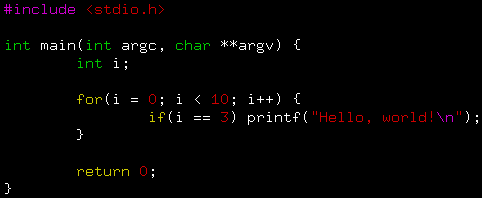
Background
Syntax highlighting is a standard feature of most modern text editors and development environments. The basic idea is to exaggerate the visual difference between various syntactical elements, to make it easier for the programmer to distinguish between keywords, punctuation and variable names.
Why was syntax highlighting invented in the first place? Did the programmers get the syntax all mixed up when reading code, thinking that ")" was perhaps a variable name or even a preprocessor directive? Of course not. While reading computer programs is often difficult, the difficulty comes from the intricacies of the program, not from the syntax.
Legibility
Perhaps syntax highlighting was invented to speed up the reading process. Yes, that must have been it, highlighted code must be easier to read. After all, it has colours!
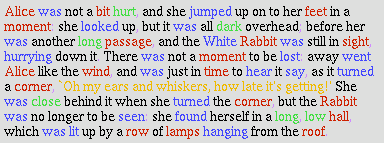
Well, no. One of the basic rules of thumb in typography is that, when writing a piece of text, you should choose one typeface and stick to it. Likewise, a splash of colour may grab the reader's attention, but it will inevitably decrease the legibility of the text. The natural flow of the text is broken, and it takes more brain effort to piece together the individual letters into words and semantics. Cognitively, the reading process becomes slightly less automatic and slightly more conscious; leaving less room in the conscious part of the mind for actually understanding the text.
Semantics are more important than syntax
Understanding is vital when reading code. Unlike novels or newspaper articles, where you can skim through a paragraph and learn the gist of it, software is inevitably full of complexities and important details that you just have to take the time to understand. To do that, you need to be looking at the code at the semantic level.
And even when the code is already well-known to them, most developers would rather come across (and fix) memory leaks, security holes and inefficient algorithms than mere syntax errors. Syntax errors will be found by the compiler anyway; the developers shouldn't waste time looking for them. But if syntax highlighting biases their minds towards the syntax of the code rather than its meaning, wouldn't they end up doing just that?
I'm not saying that developers are stupid. But since we all miss the occasional bug here and there — everybody makes mistakes — I think it would be a good idea to configure our tools to help us find them, rather than help us miss them.

Learning curve
Maybe syntax highlighting wasn't intended for experienced programmers. Maybe it was introduced in order to flatten the learning curve for newbies, much in the way that some misguided piano teachers put coloured stickers on the keys. I suppose the piano teachers do it to improve communication ("press the yellow key now!" rather than "play an F now!"), but do they honestly believe that children are unable to learn note names? They will have to, eventually, and then they will have to un-learn the colours.
The same phenomenon can be seen in user interface wizards. An advanced operation in, say, an image manipulation program is complex, and the complexity confuses new users. Enter the wizard dialogue box, which will skip or automate some of the steps, at the cost of flexibility. In the end, users only learn how to use the wizard, rather than the complex functionality itself, so the extra flexibility is lost. So you're not flattening the learning curve at all, you're bypassing it.
If you learn to write software in colour, you will probably find it difficult (or at least awkward) to look at the same code without colours, or even with a different colour scheme. Seen in that light, syntax highlighting is an educational dead end. It's like learning how to ride a bike with training wheels. You won't be able to ride a normal bike until you un-learn some of the techniques you've picked up along the way.
The exceptions
There are two cases in which syntax highlighting can actually contribute something. The first one concerns multi-line comments. If you're jumping around in a source code file, perhaps as part of an interactive search-and-replace operation, you might end up in the middle of a large block of commented-out code. You begin reading it as code, and after a while you run into an end-of-comment token, and realize that you've been reading a comment all along. In this case, rendering all comments in a different colour would have prevented the mistake.
On the other hand, that would be a short-sighted solution. Most people agree that commenting out code should be seen as a highly temporary debugging technique, and that the commented-out code must be removed or rewritten sooner or later. Changing its colour to get it out of sight would be like sweeping it under the rug.
The second case mainly concerns the C language. Accidentally writing "=" instead of "==" can result in a bug that is particularly hard to find, since you can sit and stare at it for a long time without actually seeing it. This is the only case I've found, where you would benefit from being able to focus on the syntactical level of the code, without paying too much attention to the semantic context. With syntax highlighting it would be possible to mark "=" and "==" in different colours. Yay! A good reason for implementing syntax highlighting! But — and at this point it probably won't surprise you — every colour scheme I've come across uses the same colour to highlight both "=" and "==".
Conclusions
Syntax highlighting doesn't improve legibility. It encourages you to skim through code rather than understand it. It makes you focus on syntax errors rather than real bugs, and it gets in the way of your learning. Arguably, it even encourages you to procrastinate the removal of commented-out code blocks. And current implementations of it fail to differentiate between "=" and "==", the only situation in which it would have been useful.
Who would invent such a horrible feature? My best guess is that it started out as a cool idea that was fun to implement. Now it has become a selling point; people frown upon editors that don't support it, even though they would be better off without it. This is a common enough phenomenon; examples include semi-transparent console windows and other eye-candy.
I recommend that you take the red pill: Edit your code without syntax highlighting, or at least settle for a minimalistic approach with just two colours (one for comments and one for code). Be warned that your code may actually look rather ugly without its colourful front, but at least you'll be seeing it for what it really is.
The emperor isn't naked this time around. He's wearing an amazing technicolor clown suit.
Posted Sunday 26-Aug-2007 11:44
Discuss this page
Disclaimer: I am not responsible for what people (other than myself) write in the forums. Please report any abuse, such as insults, slander, spam and illegal material, and I will take appropriate actions. Don't feed the trolls.
Jag tar inget ansvar för det som skrivs i forumet, förutom mina egna inlägg. Vänligen rapportera alla inlägg som bryter mot reglerna, så ska jag se vad jag kan göra. Som regelbrott räknas till exempel förolämpningar, förtal, spam och olagligt material. Mata inte trålarna.
Mon 15-Oct-2007 17:45
Just read your article ... and no, I am not fully convinced.
Consider intending the code. Going by your argument, is it not just about presentation rather than semantics of code. If you read the code carefully (and have enough time on hand) you can make sense of even the most ugly-intended code.
But still, like intending is a useful tool in hand, so is highlighting. And just like different styles of intending you have the right to have your own style of syntax coloring (or lack of it).
Cheers,
Arun
200 more comments hidden. Click to show all.
Linus Walleij
Wed 17-Oct-2007 21:48
But hey, if only semantics matter we could also do away with indentation and that actually (IMHO) serves some kind of purpose as a perception aid. I also perceive being cognition-wise assisted by EMACS features that blink the line of opening "{" when typing terminating "}" in the edit buffer.
The visual studio/visual assist/eclipse guys will say auto-completion helps a lot in object-oriented development. I dunno. I once saw it as a way of trying to deal with unnecessary hierarchies introduced by too much OOP.
Thu 25-Oct-2007 09:38
Maybe you wouldn't be arguing against syntax highlighting if you'd just try a simpler color scheme. An advanced editor like Visual Studio will actually help you understand what you're looking at...for instance take this random piece of code:
x = Thinger.Convert(y);
Is Thinger a class with a static Convert function? Or is it a property member of the class that this code lives in? With Visual Studio you will know because if it's a class it'll be Aqua colored and if it's a property that returns a class object, it'll just be black (by the default color scheme).
Well, with a name like Linus on a guy from Sweden, I wouldn't be surprised if you are a *nix guy who hasn't used Visual Studio much though.
Thu 25-Oct-2007 09:43
I just cannot believe that anyone could take this argument seriously.
Thu 25-Oct-2007 13:21
English prose, where the syntax forms an integral part of the reading experience, is completely uncomparable with code, which needs a rigid syntax primarily to help the compiler, not the programmer.
Thu 25-Oct-2007 14:13
And how do you prove your point? By creating a feeble straw man. We don't color our prose just as we don't start our programs with "once upon a time." The only thing in common in those two snippets is that they can be stored as a stream of ASCII characters. They serve complete different purposes and should never be conflated.
While I agree that some editors go overboard, I don't think you should throw the baby with the bathwater. Being able to step back and see the outline of your piece of code before you dive in again is extremely valuable once you grow beyond the hobbyist project.
Linus Åkesson
Thu 25-Oct-2007 15:43
Many of you complain about my comparison with prose. However, I don't use that as an argument in the text. I even write "Unlike novels..." in the section about semantics. I added the Alice in Wonderland quote as an amusing illustration. Perhaps some of you were just skimming through the article, rather than trying to understand it... =)
I believe that some things should not be made as simple as possible, because when a task is too simple, people do it without thinking. Developing software is complex and error-prone, so people need to be thinking when doing it. And yeah, I realize that these opinions are controversial to some.
Thu 25-Oct-2007 16:54
Maybe you only use intellisense for picking types in which case maybe you can get rid of highlighting, but since I type faster than intellisense 90% of the time, I like the color changing to a "type" color when I am done. It also makes finding un-escaped quotes in strings easier.
Want a story where syntax helped? OK. I used to work with the worlds worst speller, he spelled dEfault dAfault which in c/c++ is fine it just becomes a tag named "dafault:" and compiles merrily along. The misspelling is hard to spot reading through code, when at least for myself, I automatically correct misspellings when I read, but with syntax coloring it is VERY obvious. Note: He did not use coloring and I did. He spent days on the bug and had no clue. I spent 10 minutes.
Feel free to not use syntax highlighting, but if you work for me and I find a bug that would never have been had you colored your code, don't be mad when I say I told you so.
Thu 25-Oct-2007 17:21
Thu 25-Oct-2007 19:40
lft wrote:
I believe that some things should not be made as simple as possible, because when a task is too simple, people do it without thinking. Developing software is complex and error-prone, so people need to be thinking when doing it. And yeah, I realize that these opinions are controversial to some.I will give you another example I dislike wizards myself, not because they make my life too easy, but because they lead to a false sense of security and frequently mangle my own code. They make my life harder pretending to make it easier.
lft wrote:
Many of you complain about my comparison with prose. However, I don't use that as an argument in the text. I even write "Unlike novels..." in the section about semantics. I added the Alice in Wonderland quote as an amusing illustration. Perhaps some of you were just skimming through the article, rather than trying to understand it... =)Linus Åkesson
Fri 26-Oct-2007 15:53
Exactly. And making changes in code that one doesn't fully understand is bad, dangerous behaviour.
But my point is that syntax highlighting makes it easier for us to dive in and fix the code before we understand it, because it encourages us to skim through the code on a superficial level. The syntax highlighting distracts us from seeing the forest by making it easier to see the trees.
Tue 30-Oct-2007 14:52
First, and most important. If you color some program in random colors, like you did with your Alice In Wonderland text, it REALLY will be hard to read.
Computer program is not intended to be read sequentially, instead it contains several layers of semantics, tokens grouped into higher order structures. For example, thanks to syntax highlighting, when you are searching for an identifier, you can skip comments, string constants and operators. In computer program SAME english
word can have different meaning in different places and therefore will confuse you and will slow down your work. Syntax highlighting can show you, for example, that you are using library subroutine name as variable. And, in C, this can be a serious problem. In fact, ability of Visual Assist to distinguish between macros, variables and functions makes this seriously outdated language much more bearable and allows for using more powerful and dangerous features ( especially preprocessor :) ) without fear of shooting youself in the foot.
Thu 13-Dec-2007 12:51
They change the meaning of text profoundly, so it's very handy to have a way of quickly making a distinction between them.
But once I see that "x = func(a) + 2" is code, I can figure the rest on my own, thankyouverymuch.
(And quotes and such are often typeset differently in real books, too.)
[Oh, and I just came here for the Parallax score... :) Eh, happy St. Lucia Dag or whatever you call it :) ]
Fri 14-Dec-2007 16:14
Fri 4-Jan-2008 17:00
They're not random at all! He assigned colours to words of certain grammatical function. I don't know if he coloured it in all right, but verbs are one colour, nouns are another, adjectives another.. ect. It's annoying to read because our brain naturally "parses" the sentence.
Code, however, is another story. I'm not a professional programmer, I'm a physicist, but often I use colour to make proofs easier to read. Similarly I find colour coded and properly indented code to be much easier to read. But to each his own.
Wed 16-Jan-2008 21:19
Anders Carlsson [Zapac]
Tue 22-Jan-2008 12:12
Mon 28-Jan-2008 13:54
lft wrote:
Thank you for all the feedback! Some of your arguments are really good, e.g. the one about indentation. I'll have to think about that.Indentation is much more semantics than syntax, that is why indentation
actually adds readabilty to your programs.
Thu 21-Feb-2008 21:46
You are turning a personal preference into an objective matter, without even discussing the subjectivity of the matter at all. To stack upon, a misleading example of freakshow highlighting (which you connect directly to the article by its subtitle) and a totally irrelevant comparison of learning curves, even though syntax highlighting was introduced to evade common syntax errors and enabling skimming through large source codes more easily. This new feature aimed towards professional developers, since the use of computers was mainly that of developers and academics.
And yes, I know what you'll say here; "Skimming is no good, you miss things and that's bad." Well, let's take your own example of the color splash. We both agree that it takes a longer time to read those words than the main, black text, right? But as we know, professional syntax highlighting almost never colors two words next to each other in different colors, it colors the key words in one and the rest in black. Common exceptions are comments, classes and variables. This means that you read mainly black, non-highlighted code, and occasionally your eyes fixates on a variable or class name.
In this case (general programming), it is a good thing that it takes a bit longer to skim through just that word, because it is important. We don't want to miss the semantic structure, as you wrote. The result of this skimming would be a list of class names instead of classes, to more easily find what we want to focus on. Next, we step into the class and understand the parts of it by the hierarchy we retrieved from our skimming through highlighted code. The same principle is implemented all the way down.
As mentioned above, it is a very good thing to be able to differ classes from properties. Without syntax highlighting, I cannot think of a quick way to determine the object type. It is also easier to identify upper/lowercase errors on-the-fly.
Mon 10-Mar-2008 12:07
/*Second, try this piece of C code:
void main(void)
{
int d, d, ad;
printf("%d%d", dd, ad);
}
/*or PHP:*/
$pet_name = 'Pet name';
$info->name = "{$pet->name}: {$pet->name}<br />";
//in stead of
$info->name = "{$pet_name}: {$pet->name}<br />";
/*If you have previously defined both $pet (object) and $pet_name (string), you might not notice that -> is an operator. Maybe you didn't do it, but someone before you did, there's a bug in the program and now you have to find it.
It's probably hard to find where my code starts and where it ends because you don't highlight comments.*/
In the C program, there's a /* without an ending */ before void main(void). The /* may be 50 lines above and your compiler keeps complaining there's no main() function, but you can swear there is because you see it.
-Tom
Sun 6-Apr-2008 16:29
Sat 3-May-2008 23:20
I'm using Vim a lot too because it's a really great editor, but it's syntax-highlighting is indeed really crappy and useless.
On Eclipse for example there are only 2 basic highlighting colors for the stuff Vim does too: green for comments and bold purple for keywords and builtin-stuff. All other colors are used for special things like highlighting enums, classes etc. or placing a grey background behind the parts of the code that won't be parsed because of preprocessor-statements like #if, #else and so on.
Highlighting of strings, numbers, operators etc. like Vim does it isn't done by default, because it's useless most of the time.
I think the highlighting of Vim could be much better if it would only highlight comments and keywords like Eclipse does (If you ignore the things like highlighting defined variables and so on that aren't possible with a simple editor because it doesn't know all source-files of your project). Maybe the Vim-guys tried to use as much colors, as an IDE uses for all things it's able to highlight, to highlight the basic things that are normally highlighted with only 2 colors :P
Tue 22-Jul-2008 13:51
http://the-lazy-programmer.com/blog/?p=9
Thu 24-Jul-2008 22:09
Papa Smurph
Sun 24-Aug-2008 18:54
What I do to lessen the fragmented appearance of syntax colored text is to at least always use the same text format: Whenever an editor chooses italic or bold by default for certain items I set that back to normal text. That makes items pop up less, and the text hence becomes easier to read.
Sat 13-Sep-2008 03:17
I do think that syntax-highlighting traditionally tends to put emphasis on the wrong things — boldfacing language keywords and the like — but I do find it useful; I can follow the syntax more easily, which lets me focus my attention on the semantics of the program. I think comic books have shown that doing something similar to syntax highlighting on English text, by boldfacing the words that carry emphasis in the sentences, also improves readability.
You can see some of the kind of syntax-highlighting I favor at http://canonical.org/~kragen/sw/urscheme/ — comments and “noise words” like “if” are faded out a bit, and the names of functions being defined are in a conspicuous blue color which makes it easy to scan for them (rather like boldfacing a header or a term being defined). I could improve on this (it’s just Emacs’s default syntax highlighting) but it's pretty good already. The extras in the vim example in the article don’t add a great deal, to my eye, although they don’t seem quite as distracting to me as to Linus.
— Kragen Javier Sitaker <kragen@canonical.org>
alexander miglin
Wed 17-Sep-2008 17:23
Although I would agree that languages like c,c++ or even .net could really do away with them with no loss to the author.
Thu 23-Oct-2008 19:29
Thu 20-Nov-2008 06:20
However, I'd add that "syntax" highlighting alone really isn't all that helpful in understanding a piece of code. +Maybe+ for entering code, but not much else.
On the other hand, +semantic+ highlighting would be in many cases, quite useful, but I've yet to see any editor support it.
For instance, how helpful would it be to see, just from color, that a symbol is not just a variable, but it's a globally scoped var, or a local var?
Or that a member of a class was shared, public, private, or whatever.
Personally, I'd find that type of highlighting far more informative.
Angelo Bertolli
Fri 21-Nov-2008 01:49
Tue 6-Jan-2009 15:58
You thoroughly persuaded me that prose text should not be color-coded. Good job. Only prose text works by a very different mechanism than code. Code is a set of detailed, logical instructions for a computer to follow. Prose is generally either descriptive, persuasive, explanatory, or emotive--none of which applies in the least to computer code.
You say that color coding leads to this: "Cognitively, the reading process becomes slightly less automatic and slightly more conscious." But one paragraph later you say this: "software is inevitably full of complexities and important details that you just have to take the time to understand." So wouldn't you want the code reading process to be less automatic and more conscious, so you can take the time to understand what you're reading?
"Syntax errors will be found by the compiler anyway; the developers shouldn't waste time looking for them." Come on, we all know that syntax highlighting isn't about finding syntax errors. It's about disambiguating between properties and methods, or strings and code blocks. It actually clarifies the semantic content that the syntax might hide.
Here's the crux of my counter-argument, and it builds on your notion that semantics is more important than syntax: The semantics of code is tightly bound to the syntax. Natural language is horribly inefficient (by comparison) because of the redundancy and error-correction built in. With a person, you can say something ungrammatical (i.e. with syntax errors) and still be understood. With a computer, you can't just say, "Aw, you know what I meant to write--stop complaining and just do it."
~ philosaur
Linus Åkesson
Thu 8-Jan-2009 19:43
I strongly disagree. Yes, computer code is a set of instructions for a computer to follow. But it is also a means of human communication, and a good programmer strives to write code which is indeed both descriptive and explanatory.
This is a good point. I don't mind slowing down the reading process as such, but when all of that extra time is spent doing cognitive work rather than intelligent reasoning at the semantic level, nothing is gained. There's a trade-off between quantity and quality here, and my original article (or rant, if you prefer) fails to identify it.
Again, I don't agree because code is also written for human readers. By changing the names of a few identifiers, reorganizing your data structures, changing the order in which some code is executed -- even though it does not affect the runtime behaviour of your program -- you can help or mislead your audience, and even transform the program from solving problems in one domain into solving (seemingly) different problems in another domain. And when you return to the same code three months later, those choices will have a great effect on how you decide to take the program forward. Code is written for people.
Wed 25-Feb-2009 02:47
Secret: Its use is to easily spot typos (forgetting an " etc)
Tue 14-Apr-2009 12:58
A lot of the time you don't "read" code, you scan it. If you're looking for constructor calls or error messages (strings) then yes, only actually *reading* the green text is many times faster and less error-prone.
In normal text you don't skip every verb (or noun or whatever) but when briefly browsing code you *can* skip strings (green) and just look at the blue words (if,then,else,while,...) plus indentation to get the general flow of the function.
Tue 28-Apr-2009 01:09
Fri 29-May-2009 07:47
So, if you argue that colors make you lazy. Why not get rid of the language as well?
I never really used assembler, until I found the AVR. And, yes, I learned so much about The King doing that.
Let no light distract us from our path towards that elevated brightness. Thanks for sharing your 'Craft',
it enlightens my way.
Sat 30-May-2009 01:19
Sat 6-Jun-2009 22:23
Maybe you wouldn't be arguing against syntax highlighting if you'd just try a simpler color scheme. An advanced editor like Visual Studio will actually help you understand what you're looking at...for instance take this random piece of code:
x = Thinger.Convert(y);
Is Thinger a class with a static Convert function? Or is it a property member of the class that this code lives in? With Visual Studio you will know because if it's a class it'll be Aqua colored and if it's a property that returns a class object, it'll just be black (by the default color scheme).
Well, with a name like Linus on a guy from Sweden, I wouldn't be surprised if you are a *nix guy who hasn't used Visual Studio much though.
Uahh, sorry but as a serious programmer you *should* not rely on syntax highlighting to distinguish between a static function and a property. You always have to know what you are using or calling otherwise you're doomed to produce errors sooner or later. Also any serious programming language should avoid such misunderstandings as much as possible thus making highlighting mostly obsolete.
For identation I think it is a complete other story. I think identation serves more the purpose of paragraphs, making longer texts better readable as long as identation do not reach ridiculous levels.
Mon 13-Jul-2009 23:26
When syntax highlighting is distracting, turn it off.
When syntax highlighting is useful, turn it on.
Fri 7-Aug-2009 22:33
Sat 29-Aug-2009 23:58
void main(void)
{
int d, d, ad;
printf("%d%d", dd, ad);
}
You have another bug, which syntax highlighting is useless for: you double-define 'd', and you use an undefined variable 'dd'. ;)
Sun 30-Aug-2009 00:02
Actually, it is. TeX, the language underneath LaTeX, is fully Turing complete, and a BASIC interpreter for it exists. Google if you don't believe me.
Sun 30-Aug-2009 00:11
Properties vs. methods? Syntax. Strings? Syntax. Code blocks? Syntax. Yeah, I'd pretty much have to say that syntax highlighting has *nothing* whatsoever to do with code semantics, and *everything* to do with discovering syntax errors, and quickly.
Syntax highlighting, in all honesty, WAS introduced with the express intent of helping the coder review his code before kicking off a compile. Anyone who has worked in anything beyond a hobby project knows that a compile run can take minutes to complete, even with partial compilation. Who wants to wait that long?
Syntax highlighting is utterly invaluable from a static analysis point of view.
I only wish that were true. My favorite languages are Forth and Lisp. Yet, nobody codes in these awesome environments. Why? The stack is too hard for people to grok, or, there's too many parentheses.
Let's just all admit it together now: syntax matters, and it matters BIG-TIME.
Sat 5-Sep-2009 11:42
Block folding though (note that a comment block is also a kind of block)... now that's the stuff!
Now a little mind-experiment diversion: screen reader, "audio syntax highlighting".
Fri 11-Sep-2009 15:53
Tue 27-Oct-2009 20:29
Sat 14-Nov-2009 16:41
Yusuke Shinyama
Wed 9-Dec-2009 05:23
http://www-cs-faculty.stanford.edu/~knuth/screen.jpeg
When your code is of quality >= Knuth's, go ahead and claim victory for syntax highlighting. Until then I too am doing without it...
Thu 18-Mar-2010 20:51
When you are learning about verbs. Duh.
Tue 23-Mar-2010 13:51
Especially since C/C++ is not a normal language with lots of redundancies, it is crucial for reading C/C++ that you decipher the syntax as quick as possible to be able to continously reading the semantic.
Following your line of argument, you should remove all whitespaces and all line-breaks, all colours and everything from the source code before reading it. As it's all "only syntax". Non-sense!
The syntax highlighting helps to keep track of the semantic, it does not draw attention away from it!
Good syntax highlighting is used to mark different semantic contextes a word can appear in. Italic for static globals, blue for reserved identifiers, cyan for macros etc. It is uttermost important to reading the semantic that you know about the semantic context. In normal language, this is done by placing words on certain positions or by capitalize them (e.g. in german, all nouns are capitalized). It evolved because it makes text much easier to read.
Sun 2-May-2010 17:40
Do you color an 'F' differently from '6'? Just imagine how this would look:
38D2F4672B1AA9
You ARE writing code in machine code, right lft?
Using an assembler or compiler would be waaay to 'easy'.
Like driving a bicycle with training wheels.
Linus Åkesson
Mon 3-May-2010 06:17
Like driving a bicycle with training wheels.
A high-level programming language adds power by allowing you to express complex ideas concisely. Training wheels remove power by replacing a hard job with a superficially similar but easier job. It's like taking an acting class in order to become an engineer.
Sat 8-May-2010 23:46
However, I do believe that people tend to become too dependent on their specific environment. Today people are completely dependent on having bash, colorls, vim/emacs with all their own specific plugins and configuration files, etc.
Give someone who, supposedly, feels at home with Unix a system with no more than a traditional /bin/sh, the simplest form of ls and nothing more than vi, and they moan like they've been ordered, by their mom, to clean their room before they can go out and play.
I don't mind having all the bell's'whistles, but I also use the most basic of tools (ed, ftw!) from time to time, because I don't want to have to waste an hour setting up "my" environment if I need to do something with a system which is new to me.
I'm impressed with some of the vim hacks I've seen. But I'm honestly even more impressed by people who can function at full capacity without them.
Fri 23-Jul-2010 00:18
additionally, colors make your code look much more friendly :)
Fri 23-Jul-2010 16:23
But I also like Syntax Highlighting. It's something that actually helps me program. I got into my Highlighting area, and added words I know I'll use. Everything that has to do with strings is one color, math functions another. It makes it easy for me to see where things are happening in the program. Yet it's not a crutch or a training wheel, because I don't rely on it. Without it, I can still chart the flow of my program.
I see your point about not starting with it. However, I don't see a reason to get rid of it. I learned to program in BASIC. While BASIC can do things, that doesn't mean that I should have never graduated to C or further because those things help me do things faster. A good analogy would be this. You start in BASIC. Now, you move on to either C or Fortran. Well, some people prefer C and some prefer Fortran. OK, so program in the one you want to. And if you replace C with "Syntax Highlighting", and Fortran with "Syntax Non-Highlighting" there you go. Use what feels right.
Sat 24-Jul-2010 11:56
I do rely on syntax highlighting, and I think that nearly all your points are wrong.
You say the difficulty comes from the semantic of the program, not its syntax. No, it comes from both. I have tried a lot of languages, and never encountered one whose syntax had zero problems, so any help is welcome (besides, knowing several languages means being confused more easily by small syntax differences, unless my editor helps with colors).
You argue that color draw attention too much and that it becomes cognitively harder to read because of the mental overhead of processing colors.
That is very true if you use bright primary colors like in your Alice example, but a good (sober) color scheme actually do not distract, only give more information to the reader. Another thing: prose is very different from code, since its syntax is not at all relevant in the same way. Today, most default color schemes for code are not very colorful.
Concerning the mental overhead, you'll find that text color is actually processed at a nearly-hardware level by the brain. Once you are accustomed to read colored valid code, colors will only stand out when the code is invalid. The rest of the time, when the code is syntaxically valid, I can fully concentrate on the semantics. I'd rather discover (and correct) any syntax error sooner than later: running a compiler is *way* slower than having your editor tell you. And this kind of time waste is one of the very worst in software engineering.
You mention the "only" use you found for colors: knowing if you are in a comment. This can be extended easily to knowing whether you are in a valid string, or whether you made a mistake in the quoting inside the string. So that instantly makes two use cases (ok that was easy).
You say that colors make it more difficult to find bugs. Could it be that you have never encoutered a bug that was caused by syntax alone ? Compilers don't catch everything, and sometimes you use interpreters, which choke on syntax at runtime.
Your whole comparison to training wheels implicitly assumes that the end goal is knowing how to read/write code without colors. But since it is more difficult without colors, it is also less desirable to do so. My end goal is coding better and faster, so I choose to be helped by tools like a good editor and syntax highlighting. If I'm less good at writing code when there is no color, it does not matter at all, since I choosed not do otherwise.
So, I'm not convinced at all. I know by experience that with colors I can read/write better code more easily and faster. Can it really not be the case for you?
Mon 26-Jul-2010 01:49
The first thing I do when stumbling over syntax highlighting in vi, is to do a simple ":syntax off".
Thanks a lot for a very nice website!
//magnus
Mon 16-Aug-2010 17:03
Syntax highlighting is simply enhancing perceptible information. It redundantly presents essential information (i.e. the code). Syntax highlight does not *add* information, it enhances it.
It's one of the basic principles of design, and since you're into typography I kinda expected you to be familiar with this.
I always smile at hardcore coders with black&white screens, who think basic principles of cognitive psychology don't apply to them :)
Tue 17-Aug-2010 08:42
I also disagree with you. OTOH, I want to point out that there *are* sensible and stupid syntax highlighters and color schemes. The example that you provided is indeed a bad one: I don't need strings, numbers, and operators to be colored differently.
What I *do* need is indeed coloring of comments and high-level identifiers, i.e. function/class/method names.
That really enhances the perception when skimming through code.
Have a nice day,
Hans
PS: I am sorry, I have not read most of the anonymous comments yet, so maybe this has been pointed out earlier.
Linus Åkesson
Tue 24-Aug-2010 18:06
Syntax highlighting is simply enhancing perceptible information. It redundantly presents essential information (i.e. the code). Syntax highlight does not *add* information, it enhances it.
Do you also consider the prose example to be enhanced? My point is that enhancing and distracting are two sides of the same coin.
On the contrary, a basic rule of thumb of typography is to stick to a single font. SOME people use CAPS to indicate EMPHASIS, thus BREAKING this rule. I find that it makes the text less readable.
I'm happy to have made you smile.
Thu 26-Aug-2010 16:13
lft wrote:
Syntax highlighting is simply enhancing perceptible information. It redundantly presents essential information (i.e. the code). Syntax highlight does not *add* information, it enhances it.
Do you also consider the prose example to be enhanced? My point is that enhancing and distracting are two sides of the same coin.
The prose is not enhanced because the colors don't enhance essential information. In your example, you emphasize verbs and nouns. These are an important property of linguistics, but it is not essential to recognize these words as nouns, verbs or adjectives to comprehend the story. I have no idea what "type" of words you used in all the sentences of your article, but I understood it perfectly well anyway.
To put it another way: it's not essential to know if the word "was" is a noun or a verb in the sentence "Alice was not a bit hurt", whether it is highlighted or not. But it *is* essential to know that "char" indicates a data type, whether it is highlighted or not.
lft wrote:
On the contrary, a basic rule of thumb of typography is to stick to a single font. SOME people use CAPS to indicate EMPHASIS, thus BREAKING this rule. I find that it makes the text less readable.
I think you might have misunderstood my point. Contrast most definitely is one of the basic principles of design. It is brought to code in the form of syntax highlighting through colors, and brought to written language in the form of a change in size, weight, style, spacing or orientation of the typeface.
You use it on your site too: headings and subheading are written with a larger and bolder font, quoted text is encapsulated in a container that separates it from the normal text, links are underlined and have a different color than the normal text.
Your "PEOPLE WHO USE CAPS"-example is simply an example of improper use of emphasis, not a case *against* emphasis. It's like putting green text on a purple background and saying "see, syntax highlighting is evil because this particular example is unreadable!"
lft wrote:
I'm happy to have made you smile.
This was not meant to come across as a sneer at you. I enjoyed reading the article, the comments and your reply. I think it's an interesting discussion and I'm simply trying to understand your point of view. To be honest, your rebuttals are not really convincing and often contradictory.
Linus Åkesson
Sun 29-Aug-2010 19:45
lft wrote:
Do you also consider the prose example to be enhanced? My point is that enhancing and distracting are two sides of the same coin.The prose is not enhanced because the colors don't enhance essential information. In your example, you emphasize verbs and nouns. These are an important property of linguistics, but it is not essential to recognize these words as nouns, verbs or adjectives to comprehend the story. I have no idea what "type" of words you used in all the sentences of your article, but I understood it perfectly well anyway.
To put it another way: it's not essential to know if the word "was" is a noun or a verb in the sentence "Alice was not a bit hurt", whether it is highlighted or not. But it *is* essential to know that "char" indicates a data type, whether it is highlighted or not.
Oh, but it is quite essential to know what the word "was" means in order to comprehend the sentence. Part of this knowledge is the fact that the word is a verb -- although it's not essential to know that "verb" is the common terminology for this property.
Likewise, it is essential to know that "char" (or, perhaps more to the point, "person" in a piece of software where it has been declared as such) is a type. Without this knowledge, comprehension and ability to modify the code without introducing bugs would be all but impossible.
But this academic grouping has no business being at the front of the mind during programming; the programmer should be as familiar with the fundamental meaning of the word "char" as he is with the word "was". The fact that "was" and "running" have the same colour is uninteresting when reading a text, since they mean different things, and in a similar vein "char" and "person" are two different types, and it makes more sense to think of them as two separate entities in their own right, than as two instances of "type".
You use it on your site too: headings and subheading are written with a larger and bolder font, quoted text is encapsulated in a container that separates it from the normal text, links are underlined and have a different color than the normal text.
Your "PEOPLE WHO USE CAPS"-example is simply an example of improper use of emphasis, not a case *against* emphasis. It's like putting green text on a purple background and saying "see, syntax highlighting is evil because this particular example is unreadable!"
Good point. I see the problems with my example. Nevertheless, I maintain that while some typographic highlighting makes sense (such as indentation and extra whitespace, where it clarifies the intention of the code), automatic highlighting based on syntax is distracting because it emphasizes the shallow syntactic level of the code, rather than the deep semantic level.
I apologize for jumping to that conclusion.
Oisín
Wed 1-Sep-2010 17:44
lft wrote:
Like driving a bicycle with training wheels.
A high-level programming language adds power by allowing you to express complex ideas concisely. Training wheels remove power by replacing a hard job with a superficially similar but easier job. It's like taking an acting class in order to become an engineer.
You suggest that it's worse than useless because learners have to "unlearn" things after they graduate to training-wheels-free mode.
But that's not a problem if this unlearning process is quicker than the time saved in learning to ride the bicycle, and I would suggest that it is. When you add some kind of training wheels to a task, it's always a trade-off. The brain is extremely good at adapting and if you can break up one complex learning task into many small ones which are easier to master, humans can and do reassemble those small tasks into the larger performance without undue difficulty.
This is why when learning tough piano pieces, dance moves or martial arts forms, we practice them in small isolated segments before putting the segments together. For example, when learning a piano piece you might practice two bars at a time, hands separately, then together, and then one line at a time and so on. Breaking down the tasks, mastering the individual stages and then composing them back together is often much more efficient than brute-force learning the higher-level skill in a monolithic fashion.
We can use mnemonics and stickers and training wheels to help us build those skills on a more modular scale, and we can still master the high-level skill afterwards.
We can have our cake and eat it too.
Wed 1-Sep-2010 19:39
Another thought, having read all the comments (and the article ;): Does the (computer) language being syntax highlighted matter? I find it more helpful for C/C++ and Tex/LaTex, almost useless for eLisp/Lisp/Scheme and Basic.
Linus Åkesson
Fri 8-Oct-2010 07:05
Exolon wrote:
I don't get your argument against training wheels (or coloured stickers on piano keys for beginners).You suggest that it's worse than useless because learners have to "unlearn" things after they graduate to training-wheels-free mode.
But that's not a problem if this unlearning process is quicker than the time saved in learning to ride the bicycle, and I would suggest that it is. When you add some kind of training wheels to a task, it's always a trade-off. The brain is extremely good at adapting and if you can break up one complex learning task into many small ones which are easier to master, humans can and do reassemble those small tasks into the larger performance without undue difficulty.
This is why when learning tough piano pieces, dance moves or martial arts forms, we practice them in small isolated segments before putting the segments together. For example, when learning a piano piece you might practice two bars at a time, hands separately, then together, and then one line at a time and so on. Breaking down the tasks, mastering the individual stages and then composing them back together is often much more efficient than brute-force learning the higher-level skill in a monolithic fashion.
We can use mnemonics and stickers and training wheels to help us build those skills on a more modular scale, and we can still master the high-level skill afterwards.
We can have our cake and eat it too.
I agree completely in the general sense. To learn a complex thing, we must break it down into smaller parts, as the brain is able to reassemble the parts later.
In the case of training wheels, I would argue that the smaller problem (riding a bike with training wheels) is not a part of the larger problem (riding a bike without training wheels), because the child is trained to compensate for imbalance by leaning in the wrong direction.
The risk with stickers on piano keys is that the student picks up an undesired chain of associations. The goal is to be fluent in this mapping: Sheet music -> Idea of what it sounds like -> Knowing how that plays out on the keyboard -> Motor skills. A common, but unfortunate, situation is this: Sheet music -> Knowing how that plays out on the keyboard -> Motor skills -> Idea of what it sounds like. It's very hard to break free from one of these association chains once it has been formed. Colour stickers tend to form a link between (colour annotated) sheet music and knowing how it plays out on the keyboard, so they will aid in forming the wrong association chain.
Linus Åkesson
Fri 8-Oct-2010 07:22
Another thought, having read all the comments (and the article ;): Does the (computer) language being syntax highlighted matter? I find it more helpful for C/C++ and Tex/LaTex, almost useless for eLisp/Lisp/Scheme and Basic.
My opinion is that having one person's lines printed in a different colour would distract the reader from everything else in the book. However, it is not equivalent to syntax highlighting, because it doesn't emphasize information that is already there syntactically. It would be a case of semantic highlighting, and in most cases a completely useless one, although there might be cases where it clarifies who is speaking. The same effect is used by Terry Pratchett in the Discworld novels, where Death speaks in small capital letters.
I don't mind highlighting per se, when used to mark search results or in the output of grep. In the case of ls, it communicates new information (although aesthetically I prefer the suffix style of ls -F).
Regarding different languages, I would say it depends on whether there are any semantics. Markup languages are sometimes used as a tool to describe structure, without any intricate semantics to understand, and in those cases syntax highlighting wouldn't hurt as much. But if the markup language is used to markup proper text, then the semantics of that text needs all the attention it can get.
TeX poses another interesting problem, which is ligatures. Are you aware that the parser treats certain pairs of letters differently than their constituents? "ff", "fl", "--" and several others. From the point of view of the parser, these are clearly a specific kind of syntactic element. Should they be marked in a different colour? Also, in TeX it is possible to change the lexical kind of any character. You can instruct the lexer to treat the letter y as a backslash, and do this for just a part of the file. Such a change can be effected from inside a macro. A proper syntax highlighter would have to keep track of this.
Fri 5-Nov-2010 20:53
However, I do disagree strongly on the more general sentiment that syntax highlighting is in itself damaging to comprehension in the long run.
You can train your brain to do a great many things, but to not use the inherent skills of the brain is a waste of "talent" and time. If you can leverage peoples' highly developed visual senses to make the semantics more clear, this, it seems to me, is a rational choice, not a crutch. Again, we can talk about whether common syntax highlighters highlight useful things or not, but the notion that syntax can be aided by visual formatting, including color, is something I believe in.
You can do this via indenting, as everybody does, and/or color choice, as syntax highlighters try to do. I would even go further off the syntax-highlighting deep end and propose using larger fonts for higher-level structural elements like class declarations. As John Carmack said in a recent tweet: "Syntax highlighted code is better than raw text, but still not as good as, say, a typical Wikipedia page. Room for structural formatting."
Wed 8-Dec-2010 17:36
I suppose it's like coffee to the regular user: Your own belief in it keeps you coming back for more, even if it doesn't really do much at all.
Fri 17-Dec-2010 11:42
Over the time, people usually change their acceptance about all things.
Its a natural behaviour of human being.
But, as example, who could image that a player without many feature could make so much sucess just due this "beautiful" interface?
People aim for "nice" looking view of thingsbp
Most of people around the world, aim for things that really don't add anything.
Just fill try to fill the gaps in their own concience(and lack of creativity).
At least, most of us here try to create really nice things.
Hernandi - Br - ff.bpt.c
Mon 20-Dec-2010 02:11
Fri 24-Dec-2010 06:18
Sun 2-Jan-2011 18:31
Syntax coloring makes code more read-able.
You need to be able to read code before you can even understand the content, and programming languages don't usually read like natural languages, but very differently - your failed attempt at reduction ad absurdum using the exmaple of a fictional, natural language text shows that you don't understand this.
You should observe it in yourself, if you are aware enough of such things, that your brain kind of switches operational modes from reading comments in your source files, and then understanding actual code, from one second to another.
Lots of same-colored text forces you to read source code like natural languages, which makes it quite tiresome - at least compared to how I read source code and probably many others, which works much quicker than text reading, maybe your brain works differently.
Also, through different coloring, I need to type less spaces ^^
Which is probably bad should a color blind person ever read my source code, but then he could engange some auto format features of which there are plenty in many IDEs.
Your using of a pretty weird / bad coloring scheme (I'm not referring to the number of colors used, I guess I use no less) here gives an impression of dishonesty, but maybe that was just exaggeration for fun.
With horror I remember the days of monochrome IDEs in MSDOS. Yuck.
Wed 6-Apr-2011 20:11
Sat 4-Jun-2011 23:13
OTOH, one striking memory I have is the first time I came across syntax highlighting: it was when I first saw C code, in Borland's Turbo C environment for MS-DOS. After years programming in BASIC, dBase and Clipper without any special features from editors, my reaction was: "man, the syntax in C is so weird that they need to paint the code!"
Linus Åkesson
Fri 1-Jul-2011 12:16
Wow, good catch! While this was a mistake on my part, it's rather striking that it went by undetected for almost four years. Clearly, if the point of syntax highlighting is to make errors stand out, didn't we just witness a rather spectacular failure?
Wed 13-Jul-2011 15:09
Firstly, as for your last comment, your syntax highlighting was presumably done manually. Any failure to catch errors if because they were not caught at the time of the highlighting, not because the sentence is syntactically wrong.
Secondly, your argument mostly makes sense, but I think your premises are wrong.
I tend to skim my code to find my place, and I assume every coder does this. It would be monumentally wasteful to read through even a twenty line block just to find that string that you want to change, or the type of the variable you're using, or to give public access to a member, or whatever.
Basic error spotting aside, syntax highlighting functions less for me like your "highlighted fiction", and more like your bolded and/or enlarged headings which assist me in referencing specific parts of the argument without having to retrace the whole thing.
There may be other ways to achieve this goal (eg using headers and spacing, like in prose)
Furthermore, I find that without it, I can more easily go into "autopilot" and skim -- it draws my attention to what's actually happening, on some level, instead of just reading the words. And the defaults in the IDEs I've used are generally toned down enough (even when they're quite bold) that they're not distracting. In code (which is layed out and parsed very differently to prose) I can quite easily read the words while ignoring the colours (except, perhaps, on a semi sub-conscious level where they direct me semantically as well).
That said, the basic argument that form should be subservient to function, I agree. And I always suggest that new programmers do without any sort of IDE or feature-rich text-editting, because I agree that it's important not to need that crutch when starting out.
Wed 3-Aug-2011 15:14
I agree with you in that syntax highlighting generally slowing down code interpreting, since besides the textual information, the coder's brain have to interpret color information too.
But this is the general case.
As you written in your article, comment blocks are an exceptions, but another exception is string blocks. It is much more easy to find an unterminated string if strings are highlighted.
If colours marks blocks, then you don't have to necessarily interpret textual data, like direct code interpretation, so it is making reading quicker. The slowing down problem only appears when you have to interpret both textual and colour information.
So i think the ideal solution is somewhere between your theory and the eyecandy highlighting:
blocks with different function (code, comment, string) have different colour. I think even different code blocks should have other colors in mixed languaged sources (HTML/JS, C/ASM, PHP/SQL), because if you can narrow down the possible locations of the error, then your brain can orientate more easily, between code blocks, because the visible colour borders and you can concentrate immediately on the block wich holds the problem.
Syntax highlight are not bad in all cases, it is about the way of highlighting, that determines it will accelerate or decelerate reading.
Did not read the posts before me, do not know if someone said this before me.
Like your stuffs! Cheerz! (And sorry for bad english.)
Tue 23-Aug-2011 23:25
On the other hand I use both highlighting and visible tabs as a way to help me visualize the structure of the code - code as plain text looks “flat” to me.
Whenever I'm reading code, I'm not reading it sequentially from beginning to end; I might be starting on the overall structure, then narrowing in on the interesting part.
I do not like being distracted by non-code so I like comments and strings in different colors that don't stand out. Instead of pulling the attention to the highlighted code you might say that I'm pulling the attention away from uninteresting parts of the code.
If you asked me which colors I use, I wouldn't be able to answer you; I can't remember. I think I use at least three different colorschemes on a regular basis, depending on whether I'm browsing the code in an editor, a repository browser and so on.
Common for them all is that they're non-obtrusive, keeping the black normal text as the part that stands out the most. (Yes, I prefer black text on a light background.)
Fri 9-Sep-2011 01:03
vim .vimrc
syntax on ---> syntax off
<esc> ZZ
edit a C file
It feels much better now.
I never thought about this before, I just used syntax
highlighting without thinking about its negative aspects.
The code is much readable now. I am able to concentrate more
on its content and not on how it looks.
Great article.
Adam.
Wladimir
Sat 8-Oct-2011 19:34
However it might be more useful to have "semantic highlighting" instead of "syntax highlighting" for understanding. After all, a program is not plain text either. It is a tree data structure, or a computational flow diagram, depending on the level of interpretation. Some ideas for more advanced code visualization:
- style based on variable name; helps distinguish similarly-looking variable names. Maintenance programmers probably agree this could be useful
- style based on variable scope; this exists in some editors. Is a variable scoped to the object, the function or global?
- style based on depth of parse tree; useful for parsing expressions with a lot of parantheses / unclear operator precedence
- style based on inferred type information
- highlight branch paths (with arrows?), unreachable code
- highlight based on test coverage information
Etc...
Ideally an editor would support multiple views according to what the developer is doing (reading code, searching, reviewing correctness).
August Karlstrom
Tue 20-Dec-2011 22:46
Sun 22-Jan-2012 17:39
This has also allowed me to understand other people's code better. I instantly know what's a macro, what's a typedef, and what's a struct or class. It's allowed me to parse people's differing naming schemes and formatting rules much easier as well.
In my opinion, syntax highlighting and especially semantics highlighting vastly improve productivity. I would prefer it if we got rid of name formatting conventions altogether and just replace them with colors -- easier to parse, easier to understand, and easier to debug!
Thu 9-Feb-2012 23:48
Ok, I'm being a total pedant here but it must have Turbo C++. The TC v2.01 I used didn't have highlighting. It had a few bugs though - the most awful of which was implementing fread as a looped fgetc. Two orders of magnitude performance loss (actually about 75x). (TDebug was great). I still have trouble getting myself to use fread() or, thanks to DOS, allocating memory above 64KB.
Back to the point a bit - I think some editors have spent far too much programming effort on their highlighting lexers which could have been spent on useful stuff like ctag support and code outlining.
Sun 4-Mar-2012 19:10
My favorite example is when web browsers try to remember your passwords for you. You are perfectly capable of remembering your own passwords. Then what happens when you switch computers or something happens to your computer? You don't know your password.
The only possible exception to that that I can think of is if you had a very long password and you were trying to be EXTREMELY time efficient. But that seems to be stretching it.
And I definitely think humans are capable of reading and understanding code that does not have syntax coloring. The syntax coloring only replaces the intelligence of dissecting the code that you could have.
That said, I use syntax coloring. I use it mainly because I am to lazy to do the extra effort of detaching myself from it. I don't think lazy is a good thing, but people are lazy nonetheless, and I wouldn't blame anyone who uses syntax coloring. Aside from that, syntax coloring is pretty (to me, anyway) despite being inefficient, and it makes coding the slightest bit more fun.
Sat 17-Mar-2012 17:53
I second this argument. Probably the author of the post got his facts wrong. Incidentally, the author has took some pains to point out the real reason behind syntax highlighting, but conveniently labelled them as exceptions. The real reason behind syntax highlighting is to make the structure of the code clear, so that one can understand it better. If the author is using it for eye-candy, it makes one suspicious if they have written any real code at all.
Sat 17-Mar-2012 17:54
Sat 17-Mar-2012 18:55
Sat 17-Mar-2012 21:34
1) An analogy to prose text and typography. Arguing what applies to typography, should apply to code as well.
2) An analogy to learning music instruments. Arguing that since you have to to able to read notes anyway, the colors are only temporary. And if they ever change, you're having trouble reading the code.
3) Arguing that syntax highlighting does not help, not even to avoid syntax errors, since that's what compilers are here for.
Rebuttal:
1a) Typography is not a rule like "never do B". It is a contextual form of graphical composition, in which the context determines the set of rules you are going to operate on. For instance, long runs of text with few (if any) structural elements that would attract attention is typically written to be scanned front to back. Mostly that's prose (books, novels etc.). Other forms of writing use different rules, and these may include elements to attract attention to increase typographic legibility (for instance writing for the web http://www.useit.com/alertbox/9710a.html).
1b) It is only of limited merit to compare prose writing with source-code and derive meaning from that comparison. The way we read prose and the way we read sourcecode is vastly different. Typographic rules derived from reading prose do not automatically apply to sourcecode.
2) The analogy to learning music instruments and notes is flawed. You're in essence comparing programming to knowing the alphabet. It just does have no relevance whatsoever.
3a) Based on previous flawed conclusion that it doesn't help, you seek to find some merit by comparing it to error checking by a compiler. The descend into that branch of reasoning is flawed because you have not established validity of your first conclusion, and therefore it is arguing that it doesn't help because it doesn't help, i.e. circular reasoning.
3b) Assuming that any merit can be found in error checking for syntax highlighting is mostly flawed (not entirely however).
Counter:
A: You rarely sit down and read sourcecode front to back. Usually you jump around and glance at many things without reading them again, and again and again. In fact, you recognize visual patterns crossing many lines. Syntax highlighting makes those patterns more distinguishable.
B: Changing syntax highlight might be a bit annoying, but it's usually not a problem (that might be very personal)
C: You yourself admit that there is good reason to syntax highlight multiline comments, stating that it helps to avoid trying to parse text that has no bearing. Likewise, some languages support multiline strings, which accidentially would be trick you into parsing them as sourcecode.
D: Single line comments are easier to spot when highlighted as well, preventing you to read them unless you really want to.
E: keywords and other symbols that you cannot redefine in your program (of which there may be many, depending on the language) are helped to be recognized and avoided if they get painted "offensively".
F: most languages have native types. It is usually relevant to be able to glance at sourcecode and recognize weather it operates mostly with native types, or uses its own types.
G: It is generally useful to instantly see where the system code starts and whatever else is supplied by the programmer.
Resolution:
It's possible (although unlikely) that all raised arguments are valid for you (I can't entirely see how that would be the case however). I'm more inclined to think that it's just easier for *you* to read non highlighted code. Maybe you're a very textual person.
I can say with absolute certainty that I'm not a very textual person. I find non highlighted code extremely tedious to read. I've spent at some parts in my life extensive periods of time in such situations, and they where very painful. Aparts from the benefits that I do derive from syntax highlighting, I do other things to my text environment however that others find abominable (like putting it transparently over a pleasing background).
Conclusion:
Speak for yourself, syntax highlighting is good for me, maybe not for you, but good for me.
Sun 18-Mar-2012 02:26
If you don't like syntax highlighting, then don't use it, but don't try to rationalize it with a bunch of information that doesn't apply, and arguments that include saying that skimming code is bad, when in many situations it is the proper way to work. You shouldn't have to read and "understand" and entire class to just modify it or fix a bug in it, sure it's preferred but it's a little bit overkill and honestly, a waste of developer hours.
Mon 26-Mar-2012 05:47
Maybe you wouldn't be arguing against syntax highlighting if you'd just try a simpler color scheme. An advanced editor like Visual Studio will actually help you understand what you're looking at...for instance take this random piece of code:
x = Thinger.Convert(y);
Is Thinger a class with a static Convert function? Or is it a property member of the class that this code lives in? With Visual Studio you will know because if it's a class it'll be Aqua colored and if it's a property that returns a class object, it'll just be black (by the default color scheme).
Well, with a name like Linus on a guy from Sweden, I wouldn't be surprised if you are a *nix guy who hasn't used Visual Studio much though.
I use VS at work all the time, but you're actually missing the point here with this particular case.
This confusion can and should be solved by a combination of good naming conventions (I must admit I seriously question the choice of conventions MS used for C#.) and ensuring that you qualify everything except local variables (with "this" for instance members and a class name for static members). Frankly, I don't know why languages allow you to access members without qualifying them. It only leads to problems (like shadowing).
So the case you're describing does not demonstrate the useful of syntax highlighting. Rather, it demonstrates that syntax highlighting is a work around for dealing with a bad practice/language feature. What you've shown is that syntax highlighting makes it easier for us to deal with bad code and thereby encourages it, which is part of the point here.
Tue 10-Apr-2012 21:18
However, when I read the C example up top, I plowed through the whole thing in a few seconds. Not much different without syntax highlighting, except for the additional guidance, at whatever value.
I also would stand by refactoring tools and intellisense. If you're writing good code, you definitely do not need them. However, I don't think productivity tools hurt but rather save time when used properly. I can see a possibility for people to accidentally begin relying on these things, but for me it just never happened; I can still code fast without any syntax highlighting or productivity tools. Sometimes it's easier that way.
Tue 15-May-2012 19:03
now however, i see things much better, i find it much easier to understand code and went from only being able to write small javascript applications while keeping a reference handy, to working on much bigger and complex projects and even assembler.
so great article in my case :-)
Tue 29-May-2012 17:48
If you want by the way my profound opinion, I'm pro syntax highlighting. But for me it's not at all a "beginner" or "easy learning" stuff, but all the opposite. It's in the range of advanced "productivity tools". I explain a bit : as said by several earlier comments, programming isn't an easy thing. It's necessary to invest time and efforts to master this skill. And such a complex thing must not be learned with the tricks that makes it easier first.
A good approach to basic programming is to use no heavy dedicated studio, but rather have only your compiler and a basic text editor. This way of learning kinda force you to make some very basic errors (syntax) and correct them manually, and force you to understand the workflow of coding -> compiling -> linking -> executing (or whatever, depending on your fav language). I truly think that the best knowledge comes through error : if you make errors, you're able to correct them. And more than that, it creates a massive memory impact, enabling you to prevent further errors better.
So, after working in such a crude manner for some time, you will just be delighted when upgrading to something more user friendly. And you'll discover that some features will simply leverage on your root comprehension to achieve quick and effective result. To stick on syntax highlighting, I simply think it's a cool navigation system to rapidly browse the code, but that's far from the most powerful feature IDEs have to offer. All this hides a real problem, by the way, because it's very common to meet programmers who totally rely on their favorite IDE and are unable to do something outside the vendor's defined scope. That's the true danger : give much power to people that don't understand it...
And to come back on the "training wheels", I would say that you must not learn cycling with them and then re-learn without. But rather you must learn first without training wheels, and when mastered, THEN use them. And you'll be able to do real cool things with your bike that nobody have ever done ! But there I feel the comparison is maybe not so good ;)
As a conclusion, I'd just say that I found the Alice in Wonderland example very cool, but not so much convincing. The syntax of a spoken language is so far from a computer language, and the subset of keywords in the later is so thin, compared to any subset of words in a spoken language (verbs, nouns, or whatever you choose)... So to me it actually makes sense to highlight keywords in code, but absolutely not verbs in Alice. But highlighting dialogs seems to be a cool option. Yeah, I know... semantics ;)
Tue 5-Jun-2012 05:02
Tue 5-Jun-2012 14:07
Every so often I end up in an environment without it, reading the same old languages that I always do. I am no longer surprised at how monochrome code is just as easy to read as colourful code.
It is however less colourful, which is why whenever I find that VIM syntax highighting is broken, I fix it as quick as possible.
Wed 13-Jun-2012 23:54
I'm not sure who invented it, but the first paper on colour syntax highlighting I can find is here:
Van Laar, D. (1989). Evaluating a Colour Coding Programming Support
Tool. People and Computers V. A. Sutcliffe and L. Macaulay. Cambridge,
Cambridge University Press.
http://books.google.co.uk/books?hl=en&lr=&id=BTxOtt4X920C&oi=fnd&pg=PA217&dq=Evaluating+a+Colour+Coding+Programming+Support++Tool&ots=ODnn6tq2Tj&sig=JSnePqXWhUNDQPzzpNWlB91p_s8#v=onepage&q=Evaluating%20a%20Colour%20Coding%20Programming%20Support%20%20Tool&f=false
The paper showed that when colour coded syntax was applied it led to faster completion of tasks which involved visually scanning code.
Wed 8-Aug-2012 01:02
Good writing! Thank you!
--Wang Lei
Wed 17-Oct-2012 12:48
People would be just as annoyed if this was a post about debuggers versus print statements.
I've come across your article because I was pondering on the same ideas and I just did a google search. Nice article.
Sat 20-Oct-2012 22:37
Sat 2-Feb-2013 20:20
Mon 11-Feb-2013 01:03
What do you think about that?
Cheers,
Sam.
Sat 6-Apr-2013 20:39
If you would apply your logic to everything (syntax highlighting is like training wheels for the bicycle: when you get rid of them, you will get pulled out of the 'comfort zone' and would be forced to relearn again a.k.a use more time in a long run) you will end up living like a caveman. Why? Because electricity is basically the same thing: without it, some people wouldn't live that long and therefore it should not be used at all. For me, it is not the way to go. We, humans, do such things like automation and all that by understanding it must not be applied to EVERYTHING. At least because in some cases it would use up more time. But the main reason, which applies to almost everything invented, that explains why (insert any invention here) is invented at all, is time. This would be the only thing we can't manipulate with / would be able to manipulate in ∞ years. As the saying goes, time is money. And sometimes, you can make more money by using less time. It's like gambling.
In conclusion, use syntax highlighting for your own risk, by understanding the fact, there will be a day when it suddenly disappears...
Stephen Holtom
Fri 17-May-2013 11:40
For example, say a string literal is being passed in a function call. In essence, there are two bits of information for a programmer to be aware of:
1. A string literal is being passed
2. The contents of the string
Now, it is *right* that those things can be considered separately. It's right that I can saccade past the contents of the string if right now I'm not interested in that argument, and need to examine another argument to the function more closely.
It is wrong to be forced every time to track my eyes across carefully, and find the closing quote, before I can look at the next argument to the function. These little inefficiencies add up.
The analogy with a novel is false. A novel must be read in a linear fashion. For most modern code paradigms it's not even clear what linear would mean (a source file, a stack trace, an inheritance hierarchy?). Furthermore the English language does not have the same kind of formal syntactic structures as code: function calls, literals, operators, macros etc are not merely different kinds of words.
Stephen Holtom
Mon 27-May-2013 05:11
But on reflection, I don't believe it is important, or even correct.
For any sufficiently complex program, abstraction is incredibly important.
When I'm writing a class I should be concerned with just what that particular class does. And in terms of calling other classes, it should be safe to forget how they internally work. If I can't do this then this implies poor design and a creaky system. And needless to say, there should not be global variables, or shared states. I should be able to focus on a single method at a time because everything is so neatly encapsulated.
So being able to work at the "trees" level is actually an ideal.
Now I'm sure you'll say that what you mean is the big picture: an awareness of what the whole shebang is doing, and is for.
But again, for sufficiently complex programs that level is far above the level of actually looking at source code. Understanding the big picture, and your preferences for displaying code, are very far removed.
Wed 10-Jul-2013 17:20
So no, it's not crazy for natural languages to do this.
Wed 7-Aug-2013 22:17
Sun 25-Aug-2013 23:00
Wed 2-Oct-2013 12:16
I would generally say that syntax highlighting is not evil :)
I agree that some schemes don't actually work or make the programming eye lazy or cluttered!
The broken learning curve example with the wheel I believe is a loose generalisation.
Actually colored-syntax (there is another case of post formatted code {bold, italic,...}) is
a fast way of getting a top-view of your code's symmetry and beauty... after all programming is
also an art in constant progression :)
As for the the security holes and logical errors or bug-solving, in my personal and humble, if you may, opinion is that syntax highlighting has no actual impact.
Software quality is at most cases achieved by constant redesign and code review.
Yet, I agree with you totally that syntax highlighting should be investigated further because
it could actually play even a greater role in program creation if addressed correctly...
... and maybe ... using syntax-highlighting IS a part of the programmers learning curve (which never ends) to the path of no-syntax-highlighting at all.
Congrats for the article and thanks for your constructive critisism :0
Sat 16-Nov-2013 20:57
Fri 22-Nov-2013 19:01
Sun 1-Dec-2013 18:25
Secondly - a very real use for syntax highlighting - being a dope and forgetting to close quotes in strings. It can be easy to do and hard to see if your code is "contrived example\" (the \ should be \n) but with coloured code, the fact that a lot of stuff that shouldn't be a string IS would be an instant giveaway.
As for your "=" vs "==" problem, any useful compiler ought to throw a warning if it spots a "=" where a "==" is expected, like in if statements. Likewise you ought to get a warning (like "comparison with no effect") if you use "==" when an assignment would have been expected. After all, this==that; doesn't result in anything sensible, logically it will either be true or false. What is that expressed in code? Your compiler ought to tell you about this.
Tue 14-Jan-2014 22:25
Mon 27-Jan-2014 13:36
Anyway, both syntax highlighting and indentation are what's called *secondary notation* in programming. Research has shown many times that well chosen secondary notation helps with program comprehension. In some cases (like indentation) the benefits are huge.
Thu 30-Jan-2014 12:02
And I agree on the exceptions too, mostly. My own IDE has exactly two cases for syntax highlighting: Comments and strings.
Apart from that, too bad that "Swedish law applies" to my comment. I may not even touch women in that case ;-)
Sun 4-May-2014 00:03
Another point that came to mind about syntax highlighting in particular is that I use different programming languages and I look at diffs and grep output, for example, and other variants of texts. It would be silly to try and find consistent colouring rules for all the ways I have of interpreting text.
Sat 10-May-2014 13:38
WRT training wheels, I might just as well put up an argument against use of power tools.
Sun 11-May-2014 19:15
Martin Evald
Sun 18-May-2014 16:31
Thu 12-Jun-2014 18:49
Typography doesn't mean shit in this case. Typography wasn't meant for this level of abstraction.
Using your logic, one could also argue that mathematics should only be written in certain font-types. Otherwise it just wouldnt be that good, or something. Or that the matematichian couldn't understand his work, because the font is different.
For example Coda2 on MACs doen't highlight the end tag(or bracket), if you have focus on the start tag(or bracket). Notepad++ on Windows does this. Try doing HTML/error validation without that feature. You'll be wasting your time together with the clients money. Simple as that.
Some people can build a program in 20 hours, and other can do it in 1 hour. You're the 20 hour guy. Nobody is gonna pay for that shit... It's hobby-level, not pro.
In the real world, you're not gonna get to play an academic, and use hours upon hours on a project, writing reports and analyze every bit. Not gonna happen in the private market. That's incidentally why 50% of academics work for the government... Just not practical enough for a private business, where the real work gets done.
Your conclusion is wrong. Syntax highlighting does the exact same thing you says it doesn't do. It makes you focus on the important stuff... Getting payed by a happy customer.
No customer is happy paying some freak to spend 5 times the hours, than others.
This entire article is bullshit.
Stop going to school and do some goddamn work instead! Nobody is gonna pay you for this shit.
Thu 12-Jun-2014 19:07
Get a job, and stop waisting all your evenings perfecting syntax.
I work as a programmer, and what I read in this article, defies absolutely everything i know about being fast. It's like argumenting against autocomplete functionality, because it might encourage youth not to learn language or grammar.
You should be a politician and not a programmer.
I used to work as a carpenter... Same thing there. Customers don't care about how well you know how carve wood, or if you can do sculptures...They care about what you build, how fast, and what it will cost them.
Your arguments violate all of this. You sound you cost a lot, just by thinking about obvious stuff.
Thu 12-Jun-2014 19:13
This article gets my piss boyiling, because it's just so wrong, in every practical level.
Wed 2-Jul-2014 18:05
Wed 2-Jul-2014 18:16
http://www.ppig.org/papers/18th-hakala.pdf.
Here is a key part of the conclusion (page 51):
"A suprising finding was that the control scheme, black text on white background, resulted in the same overall search performance as the other coloring schemes.
...
The participants' overall comments on color usage were positive and they reported of perceived performance improvement. However, the results of the experiment do not support his intuition."
This makes the "this blog article is bullshit" comments above look quite amusing indeed.
Thu 17-Jul-2014 14:06
Sun 7-Sep-2014 20:37
Tue 9-Sep-2014 22:08
I work in 'big iron' mainframes where some of the editing tools lack syntax highlighting and others have syntax highlighting. Most new comers and experienced people report finding the lack of syntax highlighting slows down their coding and leads to more errors that are harder to find. A minority (maybe the geniuses?) report finding removing syntax highlighting a boon and I have long advocated that they develop schemes in the tools where syntax highlighting is available to remove or minimise syntax highlighting.
I haven't kept hard numbers but in my estimates are that about 90% of people write better code, faster, with syntax highlighting and 10% the opposite. Given my experience it makes sense for you to follow Linus' advice and try out the options and see what group you are in.
From years of personal experience I know I am in the 'syntax highlighting helps me' camp. I FTP code out of environments without syntax highlighting to put it into editors with highlighting and often immediately see bugs I have spent ages searching for or find design flaws that leap off the screen with some help (these are declarative and or interpreted tools with no compiler to help me).
But that doesn't mean the same is true for Linus or for you. Give it a try and find out.
Perhaps I am in the dumbo camp and Linus and you are in the genius group. It is cheap to find out. If I have a bad knee I will use crutches without shame, it would be better to not have to use them but if they get me to my goal faster or with less pain then I am not going to deny myself the help on a matter of principle. But if crutches are getting in your way more than they help then you would be a fool to keep using them.
The argument that people should only comment if they have solid statistical data is simply missing the point of what stats do and don't tell you. Group stats tell you nothing about any individual in a group. Even if 99.999% of people do better with option A if YOU are one of the 0.001% who do better with option B then 100% of YOU do better with option B. Therefore you should use option B if it makes sense to do so even though it would be a bad choice statistically.
Wed 21-Jan-2015 14:06
I will start different modes of operation:
If I'm in a hurry: syntax highlighting
If I have time, I will relax myself: no syntax highlighting
Sun 12-Apr-2015 10:04
Thu 16-Apr-2015 11:02
One interesting thing though - 99% of the textbooks I use as reference do not use any syntax highlighting for the printed code samples -- at most they use "boldface" or something to make one part stand out ocasionally, but even this is used sparingly.
Maybe the problem with syntax highlighting is when it gets too much. Like do we really Eclipse to put something in italics if it is a static member? I hate that default setting and always turn it off. If there is just a few simple syntax highlighting elements then its fine, but if the number of distinct color categories gets to be more than a few then it quickly becomes of decreasing utility to me.
Mon 4-May-2015 12:25
Sat 30-May-2015 03:48
It compounds subjectivity in reading source code. Not only do people simply think different things when they read the code, it is actually presented to them differently; hiding things that are obvious to others, and drawing attention to things that are not.
Rather than syntax highlighting being bad, the fragmentation of source code presentation is bad. Two very different approaches to fixing this are that of something like smalltalk, where the programming environment is 'built in', and everyone who works on the code uses that same interface; or that of something like golang that is packaged with a tool (gofmt) that transforms any valid go source file into one with a canonical layout. Golang also establishes a convention of applying this transformation to all golang source code before sharing it with others.
Where it is not a part of the established tooling for the language, it either amounts to inconsistency or an additional dependency. Neither of which is a good thing in the general case. Removing inconsistency makes the human interpretation of your code more coherent, and removing dependencies gives your software an additional dimension of freedom. It makes your code more portable between readers and allows you to use tools that might not provide the required dependency (syntax highlighting).
Sat 13-Jun-2015 21:52
lft wrote:
Exactly. And making changes in code that one doesn't fully understand is bad, dangerous behaviour.
But my point is that syntax highlighting makes it easier for us to dive in and fix the code before we understand it, because it encourages us to skim through the code on a superficial level. The syntax highlighting distracts us from seeing the forest by making it easier to see the trees.
I don't entirely disagree, but I find myself that syntax highlighting allows some part of the brain to parse the overall structure and find the part we need faster when we do already understand it.
I find it takes me longer to find what I need if the text isn't highlighted in a logical matter. I at least have been working with syntax highlighting so long, it doesn't distract me
Steve
Fri 14-Aug-2015 22:30
Try Solarized or some other syntax highlighting scheme that doesn't have sharp color differences.
While code is a text file, it is not prose, but really a document that relies on structure which doesn't have to be parsed along with the contents it contains.
Sat 28-Nov-2015 14:02
When you start working with code that is poorly written, you can encounter situations where a global variable, a function argument and a local variable within a section of the code are all named the same. Having all these variables look the same on the screen adds to the general confusion of reading the code, wouldn't it be nice to have better syntax highlighting for these cases? When you encounter a situation like the one I am describing, you can be the judge.
Mon 30-Nov-2015 04:51
Highlighted text is always easier to read as long as you deal with some structured data - it is no wonder that such basic command line utilities like "ls" have it too.
Highlighting is made to make LOOKUPS easier (as opposed to reading through as you'd do with prose book) and lookups is exactly the thing you'd be doing most often while working with code.
Thu 28-Jan-2016 03:32
I just cannot believe that anyone could take this argument seriously.
Totally agree. Natural language syntax is, well, natural. We don't need a helping hand to understand. Programming languages are not natural, they've been designed by someone, and highlighting a function name, or a type in a declaration is a great help to sorting through what's of immediate interest. A program is more like an aircraft's control panel, where you have to find _that_ lever quickly than something you instinctively know, like natural language.
Perhaps Mr. Akesson speaks computer languages as fluently as his mother tongue. I certainly don't however.
Fri 5-Feb-2016 12:17
Sat 6-Feb-2016 00:05
Seriously man, the only reason we have coding styles, as in typing
function() {
}
rather than
function (
)
{
}
is for readability, and quickly fix mistake, and ease of debugging.
Which what syntax highlighting does, ease debugging on the fly.
Otherwise, do you want to debug for the rest of your life? Because that is how you debug for the rest of your life.
Sat 2-Apr-2016 11:15
git clone https://github.com/user/dotfiles.git
or
vagrant init my/box && vagrant up && vagrant ssh
Yes, it takes time to set up the environment initially. But not having my tools set up causes me to waste a lot of time that could be productive. I feel handicapped without vim and git. I *can* use vi, sed, and cp, but I can work faster when higher level tools are available.
Tue 7-Jun-2016 22:23
lft wrote:
Developing software is complex and error-prone, so people need to be thinking when doing it. And yeah, I realize that these opinions are controversial to some.I agree. However, I don't see how syntax highlighting necessarily makes reasoning code easier or harder. I don't know if the arguments are specious, but I think and feel that much of the arguments here are weak and unconvincing.
You have already dismissed (without examination) the strongest argument for syntax highlighting: aesthetics. There are whole philosophies of aesthetics that makes a lot of sense, but only when we go beyond the mere results of the programming. The aesthetic argument for syntax highlighting isn't for the sake of the quality of the resulting program but rather, the quality of the experience for the programmer. That in and of itself is underestimated by a fixation on the resulting code.
There are philosophies that precisely define aesthetics, but these are generally in the non-dual philosophies, not the dualist philosophies. As soon as you have a dualist philosophy, you set up an opposition between privileging objective over subjective, or subjective over objective, and it resolves nothing. Non-dual philosophies do not privilege objective over subjective, or subjective over objective, and have a lot of useful, testable (empirical, experienceable) things to say about aesthetics.
Aesthetics bring a human perspective to the technology and reminds us that, however efficient a technology is, it shapes and is in turn shaped by our experiences as human beings.
Ho-Sheng Hsiao
Tue 7-Jun-2016 22:45
lft wrote:
Exactly. And making changes in code that one doesn't fully understand is bad, dangerous behaviour.But what about code you do understand? I don't want to wade through hundreds of lines of code because there is no syntax highlighting when I could have skimmed it to get to the part I wanted to. Even for code that I didn't write syntax highlighting helps in figuring out a lot of things like whether a piece of code is is working with properties vs. static classes vs. interfaces without jumping to the definitions to figure it out.
lft wrote:
But my point is that syntax highlighting makes it easier for us to dive in and fix the code before we understand it, because it encourages us to skim through the code on a superficial level. The syntax highlighting distracts us from seeing the forest by making it easier to see the trees.This is exactly what I want to do because I am a seasoned programmer who can understand highlighted code by skimming it to get to the gist of the issue. I can understand that as a novice you might take more time trying to understand the code but for seasoned programmers skimming works with highlighted code.
Wed 15-Jun-2016 23:30
I open a code file with plain notepad. My brain has a hard time.
I open it with notepad++, it's so much easier to separate keywords.
But there is a difference of course. The colors are not as glaring as in the screenshot.
But there should be a time where I never had such luxury when coding. I just don't remember it. Or maybe the fonts on the notepad and the white background are not helping. Maybe I should try some DOS compiler with blue background and proper easily readable fonts.
It's like I got used and can't look code without color intentation. Light colors, not glaring. I could say the same about autocomplete. I got used.
People tell me the same, how the hell can I code without double screens. I still have a single screen at my home. Maybe I'll get used to two screens some time and then it's hard to get back.
Wed 15-Jun-2016 23:43
There was this video where there is simple questions where you could fall in a trap if you are too fast to answer https://www.youtube.com/watch?v=i-aCSFD3xro
In that experiment, they discovered that if they used a much harder to read font, students would struggle but then have much higher success percentage.
So, the idea is, would it be possible that looking at code that is not as easy to read, would have different effects in problem solving? Not tabs would be a problem. But no color highlighting could be okayish, because once upon a time we didn't need it and code wasn't that bad.
Just an idea, because my instinct says it helps, but what if in specific cases, pushing a bit the brain to understand text will lead to better understanding of code or problem solving?
Wed 6-Jul-2016 12:24
Colores can be misleading or helpful. In your paragraph of quoting, you make it misleading, although you marked all words of same type with the same color, because it's not structured like we do in programming and so it cannot stand. Even you argue it's not part of your article, the image you use tends to mislead readers to agree with your point. So it's not proper.
And, if we think colors can be distracting, can indentations be? And wrong formatting? My point is, all these visual elements help us to understand the semantic part, and are useful for many. If they mislead you, they are not properly used, doesn't mean it is nothing worthy. And, if you skim and ignore important informations, maybe you skim wrongly. You cannot blame the colors.
One example of mine: when I enter a new Company, I need to adapt myself into new projects, and syntax coloring helps me to identify each element and each type, to get to know the structure of every function, method, class, etc. If I have glipsed several lines of Calendar.getXXX(), which has a distinct color to make themselves more distinguishable, I know this part is about processing date and I skip this part to the next bloc. At last we seperate code in different lines, we use indentations, we use spaces to make it more readable, not only syntax coloring. Reading code is a combination of format, not only marking them with color.
So, I insist that if we find that the format or syntax coloring is misleading, it may not because we are not paying attention, or they distracted us, but we use them in a wrong way, so we change them to fit our purposes.
Mon 22-Aug-2016 15:51
For example when using the C family of languages in combination with their prevailing all-lowercase with underscore naming convention, syntax highlighting is an absolute must have to stay sane when reading the source.
consider this C family syntax:
foo_bar_baz_t bam_boo_wah;
and compare that with its Pascal family equivalent:
VAR bamBooWah : FooBarBaz;
The Pascal family syntax stands on its own. It was designed for human readers.
By contrast, the C family syntax cannot stand on its own, it requires syntax highlighting to separate individual identifiers. This syntax was not designed for humans, it was designed for machine reading efficiency only.
When a syntax that was designed for machine reading is being abused as a tool for human writers and readers, then it must be augmented so that it becomes legible to humans.
We also do so with other syntactic entities that were not designed for human readers, for example long columns of digits are often separated by some separator symbol for human consumption even though they do not add any meaning:
00:ff:ab:07:29:f0:c0
It would be ridiculous to suggest that the separators shouldn't be used to make the data more human readable simply because one has to learn to read huge numbers of columns without separators. What for? To show off?
Sat 24-Dec-2016 12:45
Sun 15-Jan-2017 22:47
I just cannot believe that anyone could take this argument seriously.
exactly. what a joke.
i couldn't finish the rest of the article after reading that sidebar.
Mon 16-Jan-2017 03:08
When I started programming, color highlighting would have been impossible because all monitors were either white, green, or amber.
But even with modern IDE's, I find coloring to be distracting.
Now, there are SO MANY code variations, that assigning any meaning to them is rather meaningless. They are lost amid a WASH of colors.
To add to your "exceptions", here are the only other areas that I find color highlighting helpful. It is helpful not in reading code that is actually there, but helpful in finding code that is MISSING.
Unterminated strings. Missing closing tags/statements. That sort of thing.
About the only time that color coding helps me is when I see a long block of code that is obviously the *wrong* color. Pretty much the same observation you made about landing in a patch of commented out code.
And, hello from Tulsa, Oklahoma, USA.
Kirby Wallace
;-)
Mon 30-Jan-2017 04:42
I just cannot believe that anyone could take this argument seriously.
Frankly, that's EXACTLY what all syntax-coloured code looks like to me.
It colours according to distinctions I make effortlessly anyway,
and reduces contrast to the point where i have a hard time reading
ANYTHING.
Before syntax *colouring* we had syntax *styling*, which provided
all the help that colouring is alleged to provide without being
anywhere near as visually distracting. One extremely useful
thing -- in a language with seriously messed up syntax like the
C family -- was displaying the definitions of identifiers a point size
or two larger than their uses. I found that extremely helpful but have
yet to find a syntax colouring tool that does the same.
Fri 24-Feb-2017 09:43
Rather than attempt a sane response, I'll simply recommend you poke through nested Groff macros or the magic-data tables of the venerable file(1) program (ftp://ftp.astron.com/pub/file/file-5.30.tar.gz, under magic/Magdir). If you can dig through those without admitting highlighting plays a critical role in legibility, you're kidding yourself; but you're not kidding every reader shaking their head over this tripe.
Thu 20-Apr-2017 17:43
Speak for yourself.
#pragma once upon a time
(I know that the quoted comment is 10 years old.)
Fri 14-Jul-2017 21:16
Thu 31-Aug-2017 13:20
Thank you for your article. It spawned few discussion threads in comments that I found wastly interesting. Those made me richer - in new ideas, at least (which is not a small thing, I recon).
As I see this theme now: highlighting is enhancement, which when used inappropriately, can dull your professional skills with certain languages or systems.
But enhancement nonetheless.
So, as every pseudo-intelligence helper (like shell filter, or visual element in GUI... etc) it can either helpful or unhelpful - depending on 2 factors:
1. how overly smart it tries to behave
2. task you have to solve.
Personally I have chunks of HTML code in front of my eyes from server response I'm debugging. Those would be horribly unreadable if read without highlighting. I mean, at all. For me at least. Long tags with lots of properties like classes or data-... attributes over 200chars per line, CRLN-ed mid-tag, with broken indent and I have to understand what is going on inside, what's where and really don't have a chance without highlighting. Or it would be too bothersome.
In more C-like languages, I like a more minimalist take on highlighting: 3 highlighting colors of '1.comments', '2.strings', '3.everythingElse'. In some cases language constructs would be interesting to take into 4th group but that varies from language to language, from program to program.
I really like bright-red highlighting of '#TODO' in code. It is not required, but it brings a nice touch to my workflow (my memory is that of a goldfish).
When writing server-side code for pages - processing HTML-forms input, organizing sanitation of input and database queries, I would be thankful to have visible representation of invisible characters. Actually, I would like to see those in any place of a code. Also in a mix of English and Cyrillic character I'd like to discern English 'a' and 'а' - if left unchecked those could break sanity checks or functions/variables names.
But at the same time I clearly see that it is beneficial for me to have a skill to work with system having only vi + terminal to write rc-files. (I need a working Unix-like workstation - MS Windows weird water pipes are not good enough for my needs)
I assume that articles that you outlined in your article could be interesting for me, in a case if I would be developing C programs. Which as of now, I am not. So, perhaps it depends on programming language?
Tue 11-Sep-2018 04:08
However, highlighting text does have its benefits. For example: highlighting a line of text which you are trying to remember which concerning a concept or point of view. Underlining or highlighting is great for picking out main points from paragraphs. But it's not used to highlight the differences between a noun or a pronoun, or a verb from a adverb. These things need to be taught without the use of highlights.
Fri 5-Oct-2018 19:53
Thu 25-Oct-2018 12:24
- warns when you accidentally have a naming collision with one of the countless windows macros.
- shows whether an identifier is seen as parameter, variable or member
- and as you said.. comments
it would be neat to have precedence highlighted aswell but im unsure how that had to be done visually without cluttering.
Things that aren't absolutely obvious immediately thats where syntax highlighting is useful.
Tue 20-Nov-2018 10:28
lft wrote:
Many of you complain about my comparison with prose. However, I don't use that as an argument in the text. I even write "Unlike novels..." in the section about semantics. I added the Alice in Wonderland quote as an amusing illustration. Perhaps some of you were just skimming through the article, rather than trying to understand it... =)But it's only an amusing illustration if it actually manages to illustrate your point. And it doesn't. So your amusing illustration fails on both counts.
Tue 11-Dec-2018 11:34
Speaking as a non-neurotypical programmer, however, I feel the issue is more nuanced: I'm not sure the proposition is as binary as the article seems to paint it. This is my takeaway of the article, as fairly as I can put it:
* Syntax highlighting wrongly shifts the focus from structure to the building blocks themselves. This causes developers to fixate on form rather than function.
* Syntax highlighting offers a shortcut around proper understanding, until that shortcut no longer works and then the student is effectively stymied.
* Syntax highlighting encourages poor habits, such as the aforementioned skimming.
* Syntax highlighting doesn't help in situations where it would be genuinely beneficial, or at least, does not offer a sturdy enough safety net that you can afford to lean on it.
These points are fair, but I feel they are predicated on the notion that this is all that syntax highlighting can offer, particularly for programmers whose brain architecture and thus cognition may differ from that of the norm. I do not consider myself stupid (although that may be the Dunning-Kruger effect talking), but I do quite often feel stupid when faced with the common tools of the profession. To me, the benefits of syntax highlighting go well beyond simply allowing me to tell the difference between an object and a type. I shall forbear from quoting Dijkstra's observations on phrenology, and instead simply observe that given the choice between expending significant cognitive effort on following code execution and instead using that energy to be more productive, I much prefer the second option.
So what does syntax highlighting give me?
* I have ADHD. In addition, my mind is visually oriented: it uses shapes and colors to attach meaning. The way my brain partitions a program is thus a natural fit for a discreet application of color. That way, I don't have to keep the entire program in my skull (I'm a C++ programmer in a legacy codebase: we have hundreds of 7000+ LOC files that all interact in nonobvious ways, and focusing on all those details is simply unviable). It makes the code structure itself distinct to me, which is a very good help when getting my bearings, and prevents my brain from spinning out of control and overfocusing on the wrong things.
* Similarly, I've occasionally experimented with editors that let me move temporarily irrelevant code out of focus. That is a massive boon for me, because I can still easily see where things are, I'm just not forced to pay attention to them, allowing my brain to assign them a smaller portion of my attention.
* The article appears to cast understanding and skimming as mutually opposing phenomena. I would question that. To the contrary, I believe both are necessary in order to advance: it's part of what makes high-level abstractions (leakiness and all) such a powerful concept. When I look for bugs, a total in-depth understanding of all the code that passes under my eye would be detrimental... and likely take years. Instead, I skim, and while syntax highlighting may encourage skimming, I submit that is so for another reason: because it makes skimming viable and a useful tool for quickly evaluating the gist of a given piece of code. For someone such as I, who read code iteratively, it is a godsend.
* Visual Studio represents code that is defined out in a lighter shade than code that will actually run. I have no idea what I would have done if I hadn't had that feature, but I suspect refactoring would simply not have happened.
* The fact that syntax highlighting doesn't solve several preventable bugs is unfortunate. It does not, however, invalidate the concept itself. All it proves is that syntax highlighting falls short of perfection.
So I think there's value in syntax highlighting. It certainly helps me. However, there's a good case to be made against syntax highlighting as it is. On reflection, I've come to realize that the issue rather resembles the criticism levied against Hungarian notation, and that seems to indicate that the problem isn't so much that syntax can be highlighted but that it's often highlighted in the wrong manner and for the wrong reasons. We generally don't garish colors for all the types and objects and keywords.
But we *can* use it to lace the source with actual meaning, and this is particularly fine if the compiler and editor can use it to dispense with what would otherwise be useless and mentally taxing makework.
Björn Paulsen
Tue 11-Dec-2018 11:39
Fri 18-Jan-2019 18:00
Wed 20-Feb-2019 16:04
ildenir.github.io
Fri 26-Apr-2019 07:54
At first, text needs more contrast. Light green on light gray is impossibe to read. Black background would be better. Or white background and... though I cannot say, I'm using dark theme for programming, but I'm sure there should exist good light themes somewhere. The second is colors should be picked such a way, that verbs and nouns jumped into retina maybe even damaged it, while words like "and/or/else..." should be of less violent color.
Despite of that, I should say it is a great idea. If I figure out a way to algorithmically color text, I will patch my ebook reader program and try to read ebooks with coloring. I think, that reading speed should be greater. Maybe not due to coloring, but because of the need to learn new tricks, but in any case it is a really cool idea. Thanks.
Mon 5-Aug-2019 15:20
Actually, the syntax of every mainstream PL is so complex that you will often misinterpret a piece of code unless you parse each individual token in your head. Even a for a trivial PL with parentheses, you have to spend time rigorously parsing them as soon as the depth gets to around 3 or 4. This is because abstract data is represented in 1 dimension instead of something more natural for a human such as 2 dimensions. Convert something like (a (b (c (d e f)) (g h) (i j)))) to boxes and it becomes immediately obvious which is more readable. I've actually implemented a PL using just boxes and an editor that does operations on those boxes. In this case color actually is helpful because you can color code different types of boxes instead of decorating them differently (e.g to distinguish between a pattern match and composition operator).
>multi-line comments. If you're jumping around in a source code file, perhaps as part of an interactive search-and-replace operation, you might end up in the middle of a large block of commented-out code.
Actually, this doesn't work either. For example in Vim it's unreliable. You go to the middle of the file and the above stuff isn't colored the right way until you scroll up and then back down.
>With syntax highlighting it would be possible to mark "=" and "==" in different colours.
So we make two operators, which we claim are too hard to distinguish apart, and then make an optional editor that colors them. This doesn't seem like a good PL design to me.
Now all these problems are made an order of magnitude harder when you're trying to audit code for backdoors and underhanded code.
TL;DR PLs are horribly broken even at a level as trivial as syntax
I agree with the article though, syntax highlighting is useless or provides trivial benefits at best.
Fri 8-May-2020 19:04
About the fact that the coloration scares beginners, I don't think so: about all beginners don't care about colors at all, so I don't think that is the biggest point.
I tried to remove totally the coloration except for comments / strings, but I saw the problem: It is harder to find the structure of your code !
For example, I use python, and when you make a module with few classes, functions etc, it is so hard to find where your class definition is (even is python has a lot of indentation).
For sure, this problem can be deleted with using a "structure" tool (such as in Spyder) that finds the classes, the functions, and the important comments, and make crossers to them so they are clickable... but this is slower that just scroll !
Another think you say is that the coloration is not useful for remiding the keywords names: I'm don't really agree with that: indeed, I'm not a good English-speaker, and I think that even native English-speakers can misspell a "return" to a "retun", and without coloration you dont' realize it !!!! This problem can be solved with a good auto-completion device (like kite or TabNine for python), but if you work on a big file, the auto-completion is slow, and sometimes you just don't want to wait for it !
So my point of view is that the syntax highlighting for keywords should be made of shades of the same color, italic, bold and underlined words, of a light color for operators (changing depending of the operator, and the thickness also), and finally, of another light color for user-defined things (variables, objects etc...).
Thank you really much for this veryyyyy interesting article !!!
Fri 8-May-2020 19:10
So I personnally think that, if you never change your colors (not as me), you can be faster because you will be helped by the colors to CLASSIFY keywords, and to see the STRUCTURE of your code.
Wed 27-May-2020 22:24
Maybe you wouldn't be arguing against syntax highlighting if you'd just try a simpler color scheme. An advanced editor like Visual Studio will actually help you understand what you're looking at...for instance take this random piece of code:
...
Well, with a name like Linus on a guy from Sweden, I wouldn't be surprised if you are a *nix guy who hasn't used Visual Studio much though.
If anything, you're proving his case. You think your color scheme is nicer looking...so what? How does it actually improve your ability to code in a tangible way? That was his whole point. And the ad hominem attack about being a "*nix guy" just makes you look stupid.
Thu 30-Jul-2020 10:57
E.g. "market" word in English will mean same irrespective of the book your read. But in code this word can take many forms. This is where syntax highlighting helps you give that extra information.
Mon 7-Sep-2020 00:02
And syntax highlighting makes me comfortable so i use it ! I tried as you suggested to use a 2 colors syntax highlighting, but I don’t feel comfortable :(
The other thing is that you mostly consider the thing in C, that is one language. I find syntax highlighting particularly handy with Laney languages like python, lua, etc. But I won’t use it that much for C, APL, J or BASIC ! That comes from the Main ideas of each language : c is really low level so you don’t have that much improvement with syntax highlighting while python has a lot of different features and you sometimes need to differentiate them. For example, I feel comfortable to have a color for python keywords because it helps to differentiate them from a variable...
My point of view is that everything depends of what you first learnt and what you use the most : I’m quite sure that somebody that learned to read English with colors like you suggested would prefer to read with colors than without...
Astara
Wed 7-Oct-2020 15:52
* "do you rely on syntax highlighting?" Loaded question.
I learned programming long before color terminals, so it is obvious that I don't rely on it, but I do use syntax highlighting and prefer working with a color scheme, usually of my own design.
When you are _writing_ code, you are converting from design (content) to a semantic+syntactic form that communicates your idea to the computer. You might as well ask if you rely on ascii text to program rather than programming in binary.
At the point of writing, your first job is to create a syntactically valid representation of your content, followed by a semantically valid format. The color significantly aids in writing syntactically valid code, and to a lesser extent, semantically valid code. It doesn't help create content, but aids in weeding out mistakes in converting from 'design' or content to some format the machine will understand.
That's it and that's why it was created -- it may be used for other things but its primary benefit is in ensuring your syntactic and semantic translation is valid.
It immediately helps weed out many errors that would otherwise require at least, one roundtrip through the compiler (perhaps many depending on the compiler and how well it recovers from errors and can continue useful notations for other problems.
Then you go into created situations where color can get in the way. In regards to that, if you don't intimately know the coloring scheme, it will just be noise.
You compare code which has strict syntactic and semantic rules with written language which is very lax and has never been written primarily for the benefit of a computer need to understand and parse the code. For that matter, the computer usually won't see the coloring -- so it color is usually not written to help comprehension except in teaching situations.
Syntax highlighting is ONLY meant for experienced programmers who know its meaning and place. Newbies won't know your color scheme, neither will other those trying to read it.
If syntax highlighting doesn't help you in writing code. Don't use it.
If your eyes automatically detect a mismatched number of syntax elements, you don't need it. But few people have that talent, anymore than they have the talent to program in binary.
They rely on crutches to speed up translation into machine code.
FWIW, looking at code in a foreign color scheme can be disconcerting as well as slowing someone else down.
That's why you really need to find your own color style that assists you.
The same can be said for code format, spaces v. tabs, and using invisible characters vs. brackets as syntax elements.
Thinking that 1 format is best for everyone is simply naive. Forcing an unfamiliar format on someone will lower their productivity and increase errors in the code as they are constantly needing to devote some part of their brain to translate into a foreign format.
Of note -- those who don't understand and speak your own language, natively, often are are perceived as less intelligent (a bit more slow) -- because their brain always has to devote some of its bandwidth to translation.
So the best coding method is one that can be adjusted to the programmers own style -- *programatically*.
Cheers!
Fri 16-Oct-2020 17:37
lft wrote:
My opinion is that having one person's lines printed in a different colour would distract the reader from everything else in the book. However, it is not equivalent to syntax highlighting, because it doesn't emphasize information that is already there syntactically. It would be a case of semantic highlighting, and in most cases a completely useless one, although there might be cases where it clarifies who is speaking. The same effect is used by Terry Pratchett in the Discworld novels, where Death speaks in small capital letters.Not only using smallcaps, but also (IIRC, and it's been a while since I referenced the source material) without speech markers, thus conveying the fact that Death doesn't so much speak, as eality shapes itself so that Death has spoken.
Tue 15-Dec-2020 05:59
For example, a simple statement "James is running" will leave nothing vague about its meaning to most English speakers, whereas the same statement in a programming language will hold a vastly different meaning depending on the definitions of "James" "is" and "running." Besides the fact that both English and this hypothetical programming language use the same symbols to represent a statement, nothing between these two cases is similar. With syntax highlighting, information that would otherwise be completely hidden, can now be revealed, helping you better understand what the statement means.
In summary by your advice, you can go a step further and just start hand writing code rather than typing it, as you'll spend more time thinking about each line, and due to how tedious it would be to fix the mistakes, you'll be more likely to avoid making errors.
Actually, quil and parchment may be the best way to code because, you know, Shakespeare.
Sun 20-Dec-2020 17:00
The point of this article is about syntax highlighting, not about compiler abuse. Syntax highlighting being popular among devs is not a big problem, but it is a problem, and to solve a big problem, you first have to solve the simpler problems. Syntax highlighting is one of those problems.
This article doesn't "throw the baby with the bathwater", syntax highlighting is a problem, not a good thing as the idiom implies.
Ad-hominem.
Thu 18-Feb-2021 18:59
For English just highlighting token types doesn't help much. You generally already know what type all the tokens are. It's the relationship between them that gets fuzzy due to the much more complex syntax.
Which is why a "syntax-highlighted" English sentence looks like:
Well, I can't inline it. So just go here:
https://media.npr.org/assets/img/2014/08/20/gregor2_custom-c8214189bda85b6ce9baafc8dc9f3143bcda6ae3-s1600-c85.jpg
Thu 1-Apr-2021 12:00
Tue 25-May-2021 06:41
Fri 9-Jul-2021 17:16
Sat 11-Sep-2021 21:28
Try asking around for a more appealing theme.
Or just stick with white on black if that works best for you.
umuur
Fri 25-Mar-2022 01:13
Mon 1-Aug-2022 20:10
Very poor closing analogy that ruined an otherwise decent comment.
The coloring of text at the supermarket is specifically designed to call attention to itself and distract away from anything else. That is its entire purpose. There is a whole business called "marketing" built around this concept, which is totally irrelevant to the convo here.
The truth is that this type of subjective argument is as old as time. Any type of tool or feature in a development environment will have its champions and its detractors. I can remember when I started coding (back in the days when Noah was still riding around on his ark), and this same type of argument was going on over whether VT-100 terminals should always stay set at 80 characters wide because the smaller font used in the 132-character wide mode decreased legibility so much that it was distracting and ineffective. Obviously it depended on the eyesight of each individual as to whether that was true or not, but the battle lines were drawn. And the lines continue to be drawn to this day with the arrival of each new technology, programming language, or dev tool.
So if you like syntax highlighting and feel it enhances your dev workflow, use it in good health! If you find the highlighting distracting, by all means turn it off! The compilers and interpreters will be happy with the code either way.
Thu 8-Sep-2022 00:41
"No true Scotsman" fallacy
Fri 18-Nov-2022 10:49
a * b; // is this variable b: a *; or is this multiplication void(a * b); ?
I decided to stop using syntax highlighting from now on.
Fri 27-Jan-2023 02:04
I didn't yet. I don't quite know why, but I think it's simply being less stimulated with repetitive stuff with limited semantic value.
I'm setting strings and other literals to pop in a monochrome theme, boring stuff to be just a little dimmer, but not too contrasty, and it works really well.
I have a repo with several configs for VSCode right here: https://github.com/cognivore/minimal-theme-vscode/tree/hackerman
I hope it'll be useful for some people :)
Tue 28-Feb-2023 14:58
However, I fear we are in the minority of the general development community.
Fri 17-Mar-2023 16:20
I do think there is some validity to the argument against highlighting though, so I'm going to give it a try and see what I prefer. Thanks for posting this, and thanks to everyone who commented!
Fri 31-Mar-2023 20:36
It's easy to prove that syntax highlighting is not really essential to programming. Just look at blind programmers, or undeniably great programmers like Linus Torvalds who uses MicroEMACS, an editor which not only lacks syntax highlighting but many other features most programmers would consider "essential".
But it's also proven that it can help speed up development (see https://ppig.org/papers/2006-ppig-18th-hakala/ or https://ppig.org/papers/2015-ppig-26th-dimitri/, although one would wish for studies with bigger samples). The data seem to show that the more experienced the programmer, the less the impact of syntax highlighting, but that doesn't automatically make them "training wheels" as long as they still help.
Going through a compile cycle to detect a syntax error, is much worse than detecting and fixing the error on the spot. But I'd argue that syntax errors are not really the case for syntax highlighting (they can be pointed out by the semantic analyzer in a modern IDE). Their advantages are more on the semantic comprehension side. E.g. to come back to your `=`/`==` comparison: I don't know which IDE you use, but at least in my Emacs setup the coloring of the left side variable clearly changes with a switch from `=` to `==`, which helps to clearly distinguish lvalues in assignments from values in predicates (changing the coloring of the operator itself would not only have a barely noticeable effect but also wouldn't help much).
Between being blind and addicted to colors, there is a whole spectrum of people. So we can't make generalizing statements like "Syntax highlighting is good for everyone". But to make the opposite case, you'd need much better arguments and thorough research.
Thu 3-Aug-2023 16:51
Zoë Sparks
Sun 13-Aug-2023 10:11
Like so much in programming, I think there are pros and cons for both approaches.
With syntax highlighting, it's easy to quickly spot things like text or integer literals which you might want to quickly jump into a file and change. This is more convenient in some contexts than others, but when I'm hacking away rapidly on something with complicated, finicky behavior involving a lot of parameters, it's nice to have them all highlighted so they're easy to read and change at a glance. I also feel like, in languages such as C or C++, it can be handy to have all the type names stand out in the code, like if you're looking at a header file and just trying to feel out quickly what types are at play there. Also, if you spend time picking out the colors yourself especially, it can really brighten up the look of your screen while you're coding, and I don't think that should be dismissed too blithely—if you spend ten hours a day coding or whatever I think having your work environment nicely decorated could make a significant difference in your mood over time.
On the other hand, I noticed while I was trying out coding without syntax highlighting that it made me more sensitive to the formatting of my code. I usually think about that a lot to begin with, but I realized then that there were places I could lay out certain constructs more clearly that I hadn't thought about because the syntax highlighting made them look reasonably clear to me. Since other people may not use the same highlighting scheme as you, or even might not use it at all, something that's easy for you to read with your highlighting scheme might not be so much for someone else. However, if you format your code nicely without syntax highlighting, the odds of the syntax highlighting making it any harder to read are quite low, I would say. So, I think it can be a good exercise on that basis, if nothing else—if you try to make your code very readable without syntax highlighting, you can be pretty confident that it will be readable anywhere.
Thu 14-Sep-2023 04:24
Sat 18-Nov-2023 13:09
Tue 21-Nov-2023 20:01
Sat 25-Nov-2023 23:48
there are two things i'd like to add, though:
a) most default settings lower the visibility of comments, and this is just wrong: comments are way more important than the code itself, because they explain why something is done the way it is, and things the language is too weak to express. therefore, i always configure comments to be quite prominent.
b) i do find it useful to make keywords of a language stand out a little, because it makes it much easier the glean the structure of some module when skimming over it, especially if it's written by someone else.
Sun 3-Dec-2023 06:10
Sun 10-Mar-2024 18:34
I find syntax colouring exactly no use at all. I can just about accept that comments should contrast somehow, being more prominent or less prominent, but in my ideal world they would be entirely separate, as for example in a markdown cell in a Jupyter notebook.
If you must colour something, highlight the keywords in SQL. In twenty odd years I've had problems owing to keywords used as identifiers—oh, I don't know—several times. Big woop.
And one more thing. It is a rare editor that even does syntax highlighting. They all seem to colour tokens on the basis they match keywords. So see my previous paragraph.
Wed 26-Jun-2024 04:18
Me myself started moved from heavy syntax coloring to duo tone just as you recommended (comment and non comment tokens).
Never been so satisfied with minimal coloring. It allows you to smoothly move your eyes on the space of your editor (i use vim). At first it did feel lost as you are not aided by distraction of color, but overtime you get used to it and never again able to code with heavy coloring.
this is kind of debate that can only be resolved by approaching to sides, and let it naturally group together.
Sat 31-Aug-2024 18:18
There is good syntax highlighting, and there is bad syntax highlighting.
If I had infinite free time like the author, I might actually write an article about bad vs good.
Mon 14-Oct-2024 10:22
Mon 2-Dec-2024 21:08
Mon 17-Feb-2025 17:31
Mon 28-Apr-2025 19:22
Mooooo
Tue 27-May-2025 17:36
There is good syntax highlighting, and there is bad syntax highlighting.
If I had infinite free time like the author, I might actually write an article about bad vs good.
"infinite free time like the author" Very snarky.
Most great software was written without syntax highlighting. Thompson wrote Unix in three weeks -- with a line-based editor. Acme and sam don't have it either. Indenting suffices; de Raadt uses mg, which lacks syntax highlighting. As does uEmacs Linus Torvalds uses. Kernighan said he uses sam, and if he cannot, he uses vi (though he did not specify which clone), sometimes resorting to ed(1)!
I think it is just a habit. People got used to it. I spent most time in a monochrome terminal.
It is not necessary since, as shown above, talented people do not need it and most modern code is not on par with what the Thompsons and Kernighans of the world wrote. (Dennis Ritchie used acme, as a screenshot on anders.unix.se shows; NetBSD's der Mouse [Mike Parker] uses a modified Goslin emacs. The list goes on -- I've already won.)
Thu 21-Aug-2025 04:13
Mon 25-Aug-2025 09:49
I do like syntax highlightning to *read* code that isn't mine, it speeds up the process. Also useful for opening/closing brackets/parenthesis/etc mismatch checks. But in practice I use plain vim without *any* addon since 30+ years and feel fine. (But I'm not a real programmer, just occasionally).
Thu 13-Nov-2025 12:30
For the pesky syntax errors that the compiler just gets hiccups from, like a missing double-quote, I just turn on syntax highlighting for that one problem and then turn it back off when they are fixed.
So when the code compiles without errors I turn syntax highlighting off.
// Andreas
Tue 20-Jan-2026 03:22
lft wrote:
...I believe that some things should not be made as simple as possible, because when a task is too simple, people do it without thinking. Developing software is complex and error-prone, so people need to be thinking when doing it. And yeah, I realize that these opinions are controversial to some.
God this is such a refreshing opinion to see 18 years later when half the jobs available to me to require "co-pilot" experience.
I don't agree with the argument, but also I know syntax highlighting wasn't as good as it is now. But also I'm a javascript dev using vim... so that might *colour* my opinion.
I like syntax highlight as a way to make code look beautiful. I'm also into zines lately and I'm feeling the importance of expression in things. It adds a lot of information into what is being communicated.
Tue 21-Jul-2026 20:52
Now, I'm starting to find that, more generally, syntax highlighting is a significant impediment to skimming code effectively. Those splashes of color, by emphasizing the clerical structure of the language, make it difficult to grasp the structure of the writer's intuition. Your article confirms my thinking that this is not just a personal quirk.
I am very unfond of what they are calling "AI" these days. I don't know whether beating this drum would really make the situation better (by raising the bar on code quality) or worse (by improving code review just enough to keep rickety ships at sea).